Trojan Horse Malware
Trojan Malware: How It Works, Types, and Real-World Examples
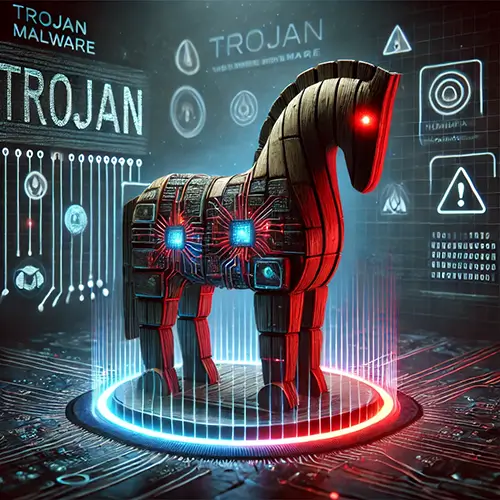
Trojan malware remains one of the most effective and widespread tools in a cybercriminal’s arsenal. Named after the infamous wooden horse used by the Greeks to infiltrate the city of Troy, a Trojan disguises itself as legitimate software to trick users into installing it. Once inside, it opens the door for attackers to spy, steal data, or cause damage.
Unlike viruses or worms, Trojans don’t spread on their own. They rely on deception—often through phishing emails, fake downloads, or malicious ads—to get onto a system. Once installed, they can steal banking information, give hackers remote control over a device, or even turn machines into part of a botnet.
Today, Trojans have evolved beyond simple nuisances. They are often the entry point for larger attacks, including ransomware, data breaches, and corporate espionage. Businesses and individuals alike face rising risks, as cybercriminals develop more advanced and harder-to-detect variants. According to cybersecurity reports, Trojans account for a significant percentage of malware attacks, causing millions in financial losses each year.
In this article, we’ll break down the most common types of Trojan malware, how they work, and what you can do to protect yourself.
How Trojans Infect Systems
Trojans rely on deception to get installed. Unlike viruses, they don’t replicate or spread automatically. Instead, attackers use social engineering tactics to trick users into downloading and running the malicious program. Once installed, a Trojan can give hackers remote access, steal sensitive information, or deliver additional malware.
Common Delivery Methods
- Phishing Emails
Cybercriminals send emails posing as trusted sources—banks, delivery services, or employers. These emails often contain malicious attachments (like Word documents or PDFs with macros) or links leading to fake websites that prompt downloads.
Stat: Phishing accounts for 91% of cyberattacks, many leading to Trojan infections. (Source: Deloitte Cyber Intelligence) - Fake Software Downloads
Trojans are often disguised as free software, games, or tools. Victims looking for pirated software, cracks, or free utilities are frequent targets. Downloading from unverified websites increases the risk of getting fake software onto your device.
Stat: 34% of malware comes from downloads of cracked software. (Source: BSA Global Software Survey) - Malvertising (Malicious Advertising)
Cybercriminals inject malicious ads into legitimate websites. Clicking these ads can automatically download a Trojan or redirect users to infected sites.
Example: In 2023, a malvertising campaign on a popular news site delivered RedLine Stealer, a Trojan targeting credentials. - Social Engineering and Fake Updates
Pop-ups prompting users to update software (like Flash Player or browsers) can lead to Trojan infections. Cybercriminals design these to look convincing, urging users to install malware disguised as updates.
Stat: 60% of fake update scams in 2022 were disguised as browser updates. (Source: Proofpoint Threat Report) - Peer-to-Peer (P2P) Networks and Torrents
Files shared on P2P platforms or torrents may be bundled with Trojans. Media files, applications, and software installers downloaded from these sources are common carriers.
Example: The Zlob Trojan was famously spread via fake video codecs offered through P2P sharing.
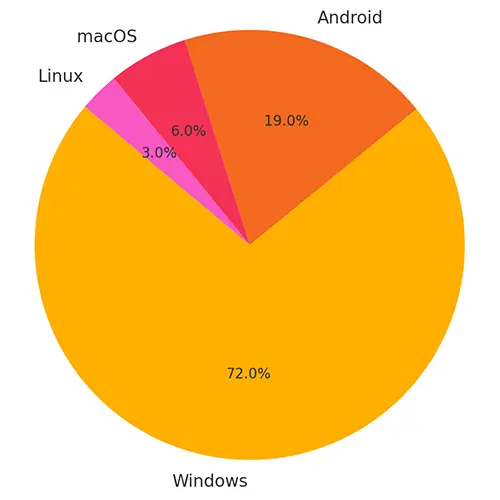
Platforms at Risk
- Windows
The primary target for Trojan malware. Due to its popularity and extensive software ecosystem, attackers often focus on exploiting Windows systems. - macOS
While less common, Trojans targeting Mac users are on the rise, often disguised as legitimate Mac software or updates. - Linux
Mostly targeted in server environments. Attackers use Trojans to gain root access or install backdoors. - Mobile Devices
Android devices are frequently targeted via malicious apps or SMS Trojans. iOS devices are less vulnerable, but jailbroken devices are exposed to Trojan infections through unofficial app stores.
What Happens After Infection
Once installed, a Trojan can silently operate in the background, often without immediate signs. This stealth makes it an ideal tool for long-term surveillance, data theft, or further malware delivery.

Quick Stat Recap
- 58% of malware infections in 2023 were Trojans. (Source: AV-Test)
- Android users saw a 50% rise in Trojan attacks via malicious apps in 2023. (Source: Kaspersky Mobile Malware Report)
- VBA Trojan was the most common malware variant in 2022. (Source: ASTRA IT, Inc.)
Common Types of Trojan Malware
Trojans come in many forms, each designed for a specific task—whether it's stealing data, spying on users, or giving attackers remote access. Understanding the different types of Trojans helps clarify how they operate and the risks they pose.
Below are the most common types, along with examples of real-world threats.
Backdoor Trojans
Purpose: Opens a hidden backdoor for attackers to remotely control a system.
Threat: Allows cybercriminals to steal files, spy on activity, install more malware, or enlist the device in a botnet.
- Back Orifice: One of the earliest and most notorious backdoor Trojans, used to remotely control Windows systems.
- Poison Ivy: Widely used in cyber espionage campaigns, giving attackers full remote access.
Downloader Trojans
Purpose: Downloads and installs additional malicious programs from a remote server.
Threat: Often used as a first-stage infection to deliver more dangerous malware, like ransomware or spyware.
- Emotet: Initially a banking Trojan, later evolved into a powerful downloader used to deploy ransomware like Ryuk.
- Nemucod: Common in phishing campaigns, known for downloading ransomware and banking Trojans.
Dropper Trojans
Purpose: Installs or "drops" other types of malware onto the infected device.
Threat: Bypasses detection by embedding malware inside seemingly harmless files.
- Lokibot: Both an infostealer and a dropper, often used to deliver ransomware and other payloads.
- DRIDEX Loader: A dropper that installs the Dridex banking Trojan.
Spy Trojans (Spyware Trojans)
Purpose: Monitors user activity and collects sensitive information like keystrokes, screenshots, and credentials.
Threat: Data theft, identity fraud, and surveillance.
- Agent Tesla: A prolific keylogger and information stealer targeting corporate credentials.
- Olympic Vision: Known for capturing screenshots and keystrokes from infected systems.
Banking Trojans
Purpose: Steals financial data such as online banking credentials, credit card numbers, and one-time passwords (OTPs).
Threat: Financial theft and fraudulent transactions.
- Zeus (Zbot): One of the most famous banking Trojans, used to steal millions through credential theft.
- Dridex: Specializes in financial fraud by hijacking online banking sessions.
- TrickBot: Evolved from a banking Trojan to a modular malware platform, often used in ransomware campaigns.
- Emotet (early versions): Targeted banking systems before shifting roles.
Remote Access Trojans (RATs)
Purpose: Gives attackers complete remote control over the infected system.
Threat: Used for spying, stealing data, and taking over webcams and microphones.
- njRAT: Popular among cybercriminals for remote surveillance and control.
- DarkComet: Despite being discontinued, it's still found in targeted attacks.
- QuasarRAT: Open-source RAT favored for its simplicity and effectiveness.
Rootkit Trojans
Purpose: Hides malware or malicious activity by manipulating the operating system.
Threat: Conceals files, processes, or registry keys to avoid detection.
- Necurs: Acted as a rootkit to protect itself and facilitate massive spam campaigns.
- ZeroAccess: Used rootkit techniques to hide its presence and operate botnets for ad fraud.
Fake Antivirus Trojans (Scareware)
Purpose: Tricks users into believing their system is infected, pushing them to buy fake software or services.
Threat: Financial scams and installation of more malware.
- Win32/FakeRean: Displays fake system alerts, urging victims to pay for bogus antivirus cleanup.
- Rogue.SecurityTool: Locks users out of their systems until they pay for "removal."
Ransom Trojans (Ransomware)
Purpose: Encrypts or locks files, demanding payment for the decryption key.
Threat: Data loss, operational disruption, and extortion.
- WannaCry: Spread rapidly in 2017, exploiting a Windows SMB vulnerability.
- CryptoLocker: Early ransomware that popularized file encryption as a cyber-extortion tactic.
- Ryuk: Targets large organizations, demanding high ransom payouts.
SMS Trojans (Mobile Trojans)
Purpose: Sends premium-rate SMS messages from infected devices without user consent.
Threat: Causes unexpected charges on mobile accounts.
- FakeInst: Disguised as legitimate apps, sends SMS to premium numbers.
- OpFake: Poses as Opera Browser, subscribes users to costly services.
Game-Thief Trojans
Purpose: Steals online gaming account credentials and in-game assets.
Threat: Account hijacking and theft of valuable virtual goods.
- Steam Stealer: Targets Steam accounts, stealing login credentials and in-game items.
- EvoGen: Collects login information for popular MMORPGs.
DDoS Trojans
Purpose: Turns infected devices into bots for Distributed Denial of Service (DDoS) attacks.
Threat: Overloads servers, disrupting websites and services.
- Mirai (Trojan variant): Hijacks IoT devices to conduct massive DDoS attacks.
- BASHLITE: Infects Linux systems to build botnets for DDoS campaigns.
Mailfinder Trojans
Purpose: Harvests email addresses from infected devices.
Threat: Enables spam campaigns and further phishing attacks.
- Trojan.Mailfinder.Agent: Scrapes contact lists for bulk spam distribution.
- Fareit: Collects email addresses along with passwords and browser data.
IM (Instant Messaging) Trojans
Purpose: Steals instant messaging credentials and spreads malware through chat platforms.
Threat: Spreads infections and facilitates identity theft.
- Kelihos Botnet: Spread malware through Skype and other messaging platforms.
- Yahos: Hijacked Facebook accounts to spread malicious links via Messenger.
Clicker Trojans
Purpose: Generates fraudulent ad clicks to inflate revenue.
Threat: Wastes bandwidth and can get networks blacklisted for ad fraud.
- Trojan.Clicker: Embedded in malicious apps that simulate clicks in the background.
- Android.Clicker.40.origin: Found in Android apps, performing click fraud operations.
Botnet Trojans
Purpose: Integrates devices into large-scale botnets controlled by cybercriminals.
Threat: Used for DDoS attacks, spamming, and cryptojacking.
- Emotet (later versions): Used its botnet for malware distribution on a massive scale.
- Necurs: Controlled millions of infected machines to distribute spam and ransomware.
Here’s a clear, practical How to Detect and Remove Trojans section:
How to Detect and Remove Trojans
Trojans are designed to hide in plain sight. Some are obvious, triggering pop-ups or slowing systems down, but many operate quietly in the background, stealing data or installing more malware. Early detection is critical to limit damage.
Common Signs of a Trojan Infection
- Slow System Performance
Your computer or mobile device slows down unexpectedly. Trojans often use up system resources. - Frequent Crashes or Freezing
Unexplained system errors or frequent application crashes could point to malicious activity. - Pop-ups and Unwanted Programs
Fake antivirus alerts, system warnings, or unknown programs launching automatically. - Unusual Network Activity
Sudden spikes in internet usage, even when you’re not actively browsing. Trojans often send stolen data to remote servers. - Disabled Security Software
Some Trojans disable antivirus programs or prevent you from visiting security websites. - Unauthorized Access or Logins
Alerts about logins from unknown locations or changed credentials without your action.
How to Detect Trojans
- Run a Full System Scan
Use reputable antivirus or anti-malware software (like Malwarebytes, Bitdefender, or Kaspersky). Ensure virus definitions are updated before scanning. - Behavior-Based Detection
Modern security solutions use behavioral analysis to catch Trojans that traditional signature-based scans miss. - Check Task Manager/Activity Monitor
Look for unknown processes consuming CPU, memory, or network bandwidth. - Use Network Monitoring Tools
Tools like Wireshark or GlassWire can help you identify unusual outbound traffic. - Review Installed Applications and Browser Extensions
Uninstall suspicious programs or browser add-ons that appeared without your knowledge.
How to Remove Trojans
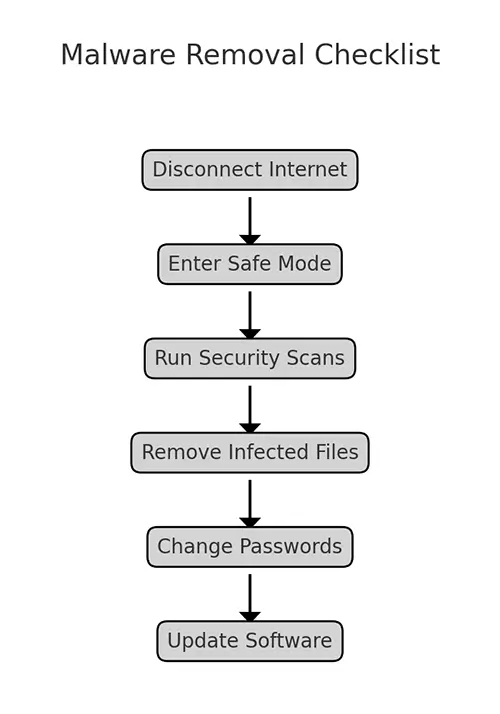
- Disconnect from the Internet
Prevent the Trojan from communicating with its command and control (C&C) server.
Disconnect Wi-Fi or unplug the Ethernet cable. - Enter Safe Mode
Booting in Safe Mode limits the Trojan's ability to operate and makes removal easier.- Windows: Restart and press F8 or Shift + F8 during boot (varies by system).
- Mac: Restart and hold the Shift key.
- Use Antivirus/Anti-Malware Software
Run a deep scan and follow the recommended actions. Most tools will quarantine or delete the Trojan automatically. -
Manual Removal (Advanced Users Only)
- Locate and delete Trojan files manually if automatic tools fail.
- Edit the registry carefully (Windows) to remove malicious entries.
- Search for and delete temporary files created by the Trojan.
- Reset Passwords
If the Trojan had remote access or keylogging abilities, assume credentials are compromised. Change passwords on all critical accounts—email, banking, and social media—using a clean device. - Update Software and OS
Patch vulnerabilities that may have been exploited to install the Trojan in the first place. - Restore from Backup (if necessary)
If removal fails or the system is too compromised, wipe the drive and restore from a clean backup.
Professional Help
If you can’t remove the Trojan or if it’s part of a larger attack (like ransomware), consider hiring a cybersecurity professional. Businesses should notify their security teams and follow their incident response plans.
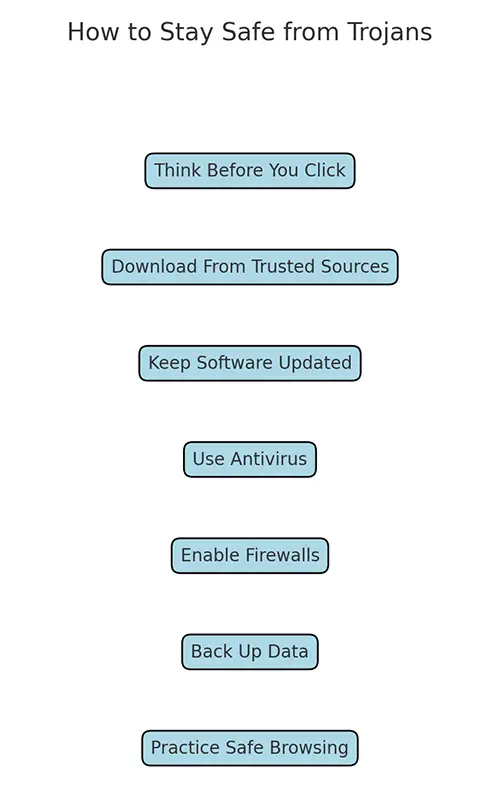
How to Prevent Trojan Infections
Preventing Trojans comes down to a combination of caution, good habits, and the right security tools. Since Trojans rely on deception rather than technical exploits to gain access, most infections can be avoided with awareness and a few basic precautions.
Be Cautious with Emails and Attachments
- Don’t open attachments or click links in emails from unknown senders.
- Verify the sender, even if an email looks legitimate. Phishing emails often imitate banks, delivery services, or well-known brands.
- Look for red flags: poor grammar, urgent language, and mismatched URLs.
- For more tips and advice about phishing emails, read our blog post How to Identify Phishing Emails in Seconds.
Only Download Software from Trusted Sources
- Stick to official websites and reputable app stores (Google Play, Apple App Store).
- Avoid cracked software, keygens, and pirated content—they are a common source of Trojan infections.
- Verify digital signatures where possible to ensure authenticity.
Keep Your Operating System and Software Updated
- Install security patches as soon as they are available.
- Enable automatic updates for your OS, browsers, and antivirus tools.
- Unpatched systems are easy targets for Trojans and other malware.
Use Strong Security Software
- Install reputable antivirus and anti-malware programs with real-time protection.
- Consider tools that offer behavior-based detection in addition to signature scanning.
- Keep your security software updated—outdated definitions can miss newer threats.
Enable Firewalls and Network Protection
- Use a firewall to monitor inbound and outbound traffic.
- Block unauthorized connections and restrict access to unknown applications.
- For businesses, deploy intrusion detection/prevention systems (IDS/IPS).
Practice Good Password Hygiene
- Use complex, unique passwords for every account.
- Enable multi-factor authentication (MFA), especially for sensitive accounts like email and banking.
- Use a password manager to store and generate strong passwords securely.
Regularly Back Up Important Data
- Perform regular backups of critical files and system images.
- Store backups offline or in secure cloud storage, separate from your main system.
- Backups help restore your data quickly in case of an infection or ransomware attack.
Stay Informed About Current Threats
- Follow cybersecurity news to stay updated on new Trojan campaigns and malware trends.
- Educate employees or family members on safe internet practices.
- Businesses should conduct regular cybersecurity awareness training.
Secure Mobile Devices
- Install apps only from trusted stores.
- Review app permissions carefully—deny access to unnecessary features like SMS or contacts.
- Keep mobile operating systems and apps updated.
- Avoid jailbreaking or rooting devices, which exposes them to more threats.
For Businesses
- Implement endpoint protection across all devices.
- Conduct regular security audits and penetration testing.
- Develop and maintain an incident response plan in case of infection.
Staying Ahead of Trojan Threats
Trojan malware continues to evolve, becoming more sophisticated and harder to detect. From stealing banking credentials to enabling ransomware attacks, Trojans remain one of the most dangerous forms of malware targeting individuals and businesses alike.
The good news is that most Trojan infections can be prevented with basic security practices: cautious browsing, downloading only from trusted sources, keeping software up to date, and using strong security tools. For businesses, layered defenses and regular employee training are key to reducing risk.
No system is immune, but staying informed and proactive can make the difference between a minor scare and a costly breach. Cybercriminals are counting on users to let their guard down. Don’t make it easy for them.