How to Choose the Right Antivirus Software
Introduction: Why Antivirus Still Matters
Antivirus software isn’t just for your grandpa’s Windows XP machine anymore. Even with modern operating systems offering built-in protections, threats have evolved. Malware, ransomware, phishing, and spyware are more sophisticated and more common than ever. And they’re not just targeting big businesses — regular users get hit all the time.
Antivirus tools have also come a long way. They’re faster, smarter, and packed with features that go beyond just scanning for viruses. Think of them as digital bodyguards, keeping an eye out for anything suspicious, blocking attacks before they happen, and helping clean up if something slips through.
Choosing the right antivirus isn’t just about picking the most popular name or downloading the first free one you see. It’s about understanding what you need, what’s worth paying for, and what to avoid. This guide will walk you through how to make a smart choice — without the jargon or fluff.
Understanding What Antivirus Software Does
Antivirus software is your frontline defense against digital threats. Its core job is simple: detect, block, and remove malicious software before it can harm your device or steal your data. But modern antivirus does a lot more than just scan for viruses.
At a basic level, antivirus tools use signature-based detection to identify known threats. Think of this like a wanted poster system — if the software recognizes a file as matching a known piece of malware, it blocks it immediately. But threats are constantly evolving, which is where heuristic and behavior-based detection comes in. These methods look for suspicious activity or unusual patterns, even if the specific malware hasn’t been seen before.
Most antivirus programs also include real-time protection, which means they’re always running in the background, scanning downloads, links, attachments, and apps as you use your device. Many also quarantine threats, isolate suspicious files, and let you review them before deletion.
Antivirus isn’t just about viruses anymore. It protects against ransomware, spyware, trojans, keyloggers, and even phishing links — covering a much wider range of digital dangers than it did a decade ago.
Core Features to Look For
Not all antivirus software is created equal. Some offer basic protection, while others pack in advanced tools that make a real difference. Here are the core features you should look for — the ones that matter most for everyday users and power users alike.
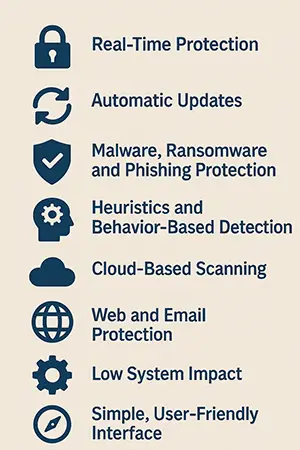
🔒 Real-Time Protection
This is non-negotiable. Real-time protection means the antivirus is always running in the background, monitoring files, downloads, and processes as they happen. It stops threats before they can do damage, not just after the fact.
🔄 Automatic Updates
Threats change fast. You want antivirus software that updates itself frequently, without you having to think about it. These updates include new virus definitions, security patches, and performance improvements — all essential to staying protected.
🛡️ Malware, Ransomware, and Phishing Protection
Good antivirus blocks more than just viruses. It should handle:
- Malware: broad category including spyware, trojans, and worms
- Ransomware: locks your files and demands payment — prevention is key
- Phishing: fake websites and emails that steal your info — often the biggest threat to everyday users
🧠 Heuristics and Behavior-Based Detection
Modern threats don’t always show up in virus databases. Look for software that uses heuristics and behavioral analysis — these detect new or unknown threats by spotting shady behavior, not just matching known signatures.
☁️ Cloud-Based Scanning
This feature sends suspicious files to the cloud for faster, smarter analysis — without bogging down your device. It also helps catch threats that your local scanner might miss.
🌐 Web and Email Protection
A lot of threats come through links and attachments. Your antivirus should scan email content, web pages, and downloads in real time. Bonus points for blocking access to known malicious sites automatically.
⚙️ Low System Impact
Security is useless if it slows your system to a crawl. Look for software that’s known for a light footprint, so you stay protected without sacrificing speed or performance.
🧭 Simple, User-Friendly Interface
You shouldn’t need a tech degree to stay safe. A clean, intuitive dashboard makes it easier to run scans, check alerts, and tweak settings without confusion.
Bottom line: These core features form the backbone of any good antivirus program. If software lacks any of these, it’s probably not worth your time.
Optional Features That Might Matter to You
While core protection is the priority, many antivirus programs bundle in extra features. These aren’t essential for everyone, but depending on how you use your devices, they might be worth paying for.
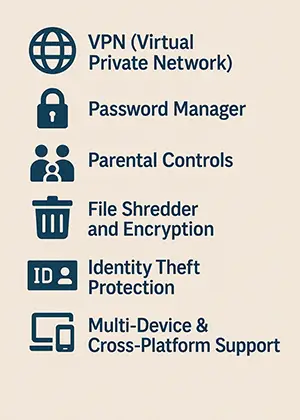
🌐 VPN (Virtual Private Network)
Some antivirus suites include a built-in VPN for secure, encrypted internet browsing. Great for privacy, public Wi-Fi, or bypassing location restrictions. Just note: free versions often come with data limits or speed caps.
🔐 Password Manager
If you’re still reusing the same password everywhere (don’t), a built-in password manager can help. It creates and stores strong, unique passwords for all your accounts — no need to remember them all.
👨👩👧 Parental Controls
Useful for families. These tools let you monitor and limit kids’ online activity, block inappropriate content, and set screen time rules — all from a central dashboard.
🗑️ File Shredder and Encryption
Deleting a file isn’t always enough. A file shredder ensures sensitive data is permanently erased, while file encryption adds a secure lock to private files and folders.
🆔 Identity Theft Protection
Some antivirus services monitor the dark web and alert you if your personal info (like Social Security numbers or credit card details) is leaked. May include recovery support too.
📱 Multi-Device & Cross-Platform Support
If you’re using Windows, macOS, Android, and iOS devices, choose software that covers them all under one subscription. Simplifies management and saves money.
These extras aren’t for everyone, but they can add real value if they match your needs. Focus on what you’ll actually use — not just what sounds cool.
Free vs. Paid Antivirus: What’s the Difference?
Free antivirus can be enough — but it comes with trade-offs. Most free antivirus versions cover the basics: real-time protection, malware scanning, and automatic updates. For light users who practice safe browsing habits and don’t need extras, free protection might be all you need.
But you should know what you’re giving up.
Paid antivirus software usually unlocks the full feature set. This can include:
- Ransomware protection
- Phishing and fraud detection
- Email and web filtering
- Parental controls, VPN, password manager, and more
- Priority support and faster updates
You also get fewer ads, no constant upgrade prompts, and better overall performance tuning in many paid versions.
Free options sometimes come with hidden costs — like limited customer support, lack of advanced detection, or annoying upsells. Some even collect data for advertising. Always read the fine print.
If you’re using a single device carefully, a good free antivirus might be good enough. But if you’re handling sensitive data, have multiple devices, or just want peace of mind, a paid plan is worth it.
Bottom line: Free is fine for the basics. Paid is for when security really matters.
Compatibility and Performance Considerations
Even the best antivirus won’t help if it doesn’t run smoothly on your device. Before you commit, make sure the software is compatible with your system and won’t slow everything down.
Start with the basics:
- Is it designed for your operating system (Windows, macOS, Android, iOS)?
- Does it support the version of your OS? Some older or very new systems might be left out.
Performance matters, too. Some antivirus programs are notorious for hogging system resources — causing slow boot times, laggy apps, or fan-blasting CPU spikes. Look for options known for a light system impact, especially if you’re on an older machine or using resource-heavy software.
Also check how well it plays with other apps. Avoid running multiple antivirus tools at once — they can interfere with each other, causing more harm than protection.
The goal is simple: Stay protected without sacrificing speed or stability.
User Experience & Support
Good security software should be easy to use. If the interface is confusing or cluttered, you’re less likely to use it — and that defeats the purpose. Look for antivirus programs with a clean dashboard, clear notifications, and simple scan options.
Support also matters. When something goes wrong, can you reach a real human? Check if the provider offers 24/7 support, live chat, or at least a helpful knowledge base.
Bottom line: A user-friendly experience and solid support aren’t just nice extras — they’re part of what makes an antivirus actually usable and trustworthy.
Reputation, Reviews, and Lab Test Results
Not all antivirus brands are created equal — and flashy marketing doesn’t equal real protection. Before you download anything, take a minute to check the product’s reputation.
Start with independent lab tests. Sites like AV-Test, AV-Comparatives, and SE Labs regularly test antivirus software for detection rates, false positives, performance impact, and more. These results give you a clear, unbiased look at how a product performs in the real world.
Also look at user reviews — especially the critical ones. They can reveal issues with customer service, billing, bugs, or unexpected limitations that don’t show up in marketing materials.
Be cautious of unknown brands or “too good to be true” reviews. Some shady antivirus programs are actually malware in disguise.
Trust and transparency matter. Stick with software that has a proven track record, clear privacy policies, and a history of responding to security issues — not hiding them.
Red Flags and What to Avoid
Some antivirus software does more harm than good. Here’s what to steer clear of:
- "Free" antivirus from sketchy sources — these often come bundled with malware or adware.
- Scareware — fake programs that flood you with alerts to trick you into paying for bogus protection.
- Aggressive upselling — if you're constantly bombarded with upgrade prompts or fake warnings, walk away.
- Shady privacy policies — some free tools collect your data for marketing or resale. Always read the fine print.
If something feels off, it probably is. Stick with trusted names and verified downloads.
How to Evaluate and Choose Based on Your Needs
The “best” antivirus depends on you. Before downloading anything, take a step back and ask what you actually need — not just what sounds powerful.
Start with your tech comfort level.
- Do you want something simple and automatic?
- Or are you comfortable customizing settings and reviewing security logs?
Next, consider your device setup:
- One personal laptop? A basic plan might be enough.
- A household of mixed devices? Look for multi-device, cross-platform support.
Think about your risk level:
- Are you often downloading files, visiting sketchy sites, or clicking unknown links? You’ll want robust web and phishing protection.
- Handle sensitive work or financial data? Consider ransomware protection, VPN, and identity monitoring.
Also factor in your budget.
- Some free tools are surprisingly solid.
- But if peace of mind matters more than saving a few bucks, a paid plan is a smart investment.
Always try before you buy. Look for antivirus software with a free trial or money-back guarantee — so you can test it in your daily routine before committing.
The right antivirus fits your lifestyle, not just your device.
Final Tips Before You Install
Before hitting “Install,” take a few quick steps to make sure your antivirus works as intended:
- Uninstall any other antivirus software first. Running two at once can cause conflicts, slowdowns, or false positives.
- Restart your device after install. It helps the software fully activate and start real-time protection.
- Enable automatic updates. Set it and forget it — staying current is half the battle.
- Stick to good habits. Even the best antivirus can’t fix bad clicks or weak passwords.
Antivirus is a tool — not a magic shield. Pair it with smart behavior and you're way ahead.
Conclusion: Protect Smart, Not Just Hard
Choosing antivirus software isn’t about finding the “best” — it’s about finding the right fit for you. Start with strong core protection, then add features that match your habits and devices.
Don’t get distracted by hype or overloaded bundles. Focus on what you’ll actually use and what keeps you safe without slowing you down.
Free or paid, simple or full-featured — the key is consistency. Keep it updated, let it run, and combine it with smart habits.
Digital threats aren’t going away. But with the right antivirus, neither is your peace of mind.
Antivirus Software Testing Labs:
- AMTSO Anti-malware Testing Tracker
- AV-Comparatives
- AV-Test
- AVLab Cybersecurity Foundation
- MRG Effitas
- SE Labs
- Testing Ground Labs
- VB Virus Bulletin