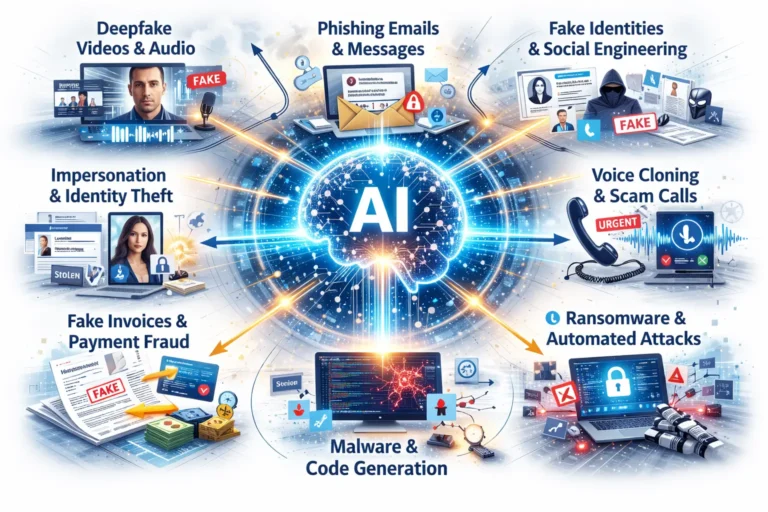
Did you know that over 3 billion phishing emails are sent daily, targeting unsuspecting individuals and businesses alike? Phishing emails are one of the most common tactics used by cybercriminals to steal sensitive information, compromise accounts, and wreak havoc on digital lives. From fake bank alerts to too-good-to-be-true job offers, these emails are designed to exploit our trust, urgency, and curiosity.
In today’s fast-paced world, we often skim through our inboxes without a second thought, making it easier for malicious emails to slip through the cracks. The consequences can be devastating—financial loss, identity theft, and even damage to professional reputations. But the good news is that recognizing a phishing email doesn’t have to be a complex or time-consuming task.
This blog post will arm you with practical tips and examples to help you identify phishing emails in seconds. By learning to spot red flags like suspicious links, fear-inducing language, and generic greetings, you can protect yourself and others from falling victim to cyber scams. Whether you’re an individual looking to safeguard your personal data or a business professional aiming to secure your company’s resources, this guide will empower you to stay one step ahead of cybercriminals.
Ready to outsmart the phishers? Let’s dive in!

What Are Phishing Emails?
Phishing emails are fraudulent messages crafted by cybercriminals to deceive recipients into divulging sensitive information, such as passwords, credit card details, or personal data. These emails often appear to come from trusted organizations, such as banks, online retailers, or well-known companies, but their true purpose is malicious.
The Different Types of Phishing Emails
Phishing tactics have evolved over the years, making them harder to detect. Understanding the different types can help you identify them quickly:
- Spear Phishing
Unlike generic phishing emails, spear phishing targets specific individuals or organizations. For instance, an email might appear to come from your company’s IT department, asking you to reset your password. These emails often include personal details to make them more convincing. - Clone Phishing
In this method, cybercriminals duplicate a legitimate email—such as a shipping confirmation—and replace the links or attachments with malicious ones. This tactic exploits the trust you have in familiar formats or brands. - CEO Fraud/Business Email Compromise (BEC)
These emails impersonate senior executives or business partners to request sensitive information or authorize fraudulent transactions. For example, an email might claim to be from your CEO, urgently requesting a wire transfer.
Why Phishing Emails Work
Phishing emails exploit human psychology and behavioral tendencies to succeed. Here’s how:
- Urgency and Fear: Messages like “Your account will be deactivated in 24 hours” compel recipients to act without thinking.
- Authority: Emails claiming to be from high-ranking individuals or trusted organizations can intimidate people into compliance.
- Curiosity and Temptation: Promises of rewards, job offers, or exclusive deals entice recipients to click on links or open attachments.
Phishing attacks thrive because they exploit a universal truth: we’re busy, distracted, and trusting of entities that seem legitimate. Recognizing these tactics is the first step in protecting yourself from these scams. In the next section, we’ll dive into the telltale signs of phishing emails, complete with examples to sharpen your detection skills.
Common Characteristics of Phishing Emails
Phishing emails often contain subtle (and sometimes glaring) clues that reveal their true nature. Knowing how to identify these red flags can save you from falling victim to a scam. Let’s explore the most common characteristics of phishing emails and how to spot them in seconds.
Suspicious Sender Information
Phishing emails often come from email addresses that mimic legitimate ones but have slight discrepancies. These subtle differences are designed to deceive recipients into believing the sender is trustworthy.
- Example: An email claiming to be from PayPal might come from an address like support@paypall.com instead of the legitimate support@paypal.com.
- How to Spot It:
- Hover over the sender’s email address to verify the domain.
- Check for misspellings or unusual formatting in the address.
Urgent or Fear-Inducing Language
Phishers create a sense of urgency to pressure you into acting without thinking. These emails often use scare tactics like account suspension, legal threats, or warnings of unauthorized access.
- Example:
Subject: “Your Account Has Been Locked!”
Body: “We’ve detected suspicious activity on your account. Log in within 24 hours to avoid permanent suspension.” - How to Spot It:
- Legitimate companies rarely create urgency through threats.
- Pause and verify the claim through official channels, such as logging in directly to your account on the company’s website.
Generic Greetings
Phishing emails often avoid addressing recipients by name because they are sent in bulk to many people. This lack of personalization can be a clear warning sign.
- Example: “Dear Customer” or “Dear Valued Member.”
- How to Spot It:
- Most legitimate organizations personalize emails with your name or username.
- If the greeting feels impersonal or generic, proceed with caution.
Poor Grammar and Spelling
While many phishing scams have become more sophisticated, many still contain obvious grammatical errors and awkward phrasing. Legitimate companies typically have professional communication standards.
- Example:
Subject: “You acount has ben limited. Please update your details for your securty.” - How to Spot It:
- Look for spelling mistakes, missing words, or incorrect sentence structures.
- Unprofessional language is often a dead giveaway.
Suspicious Links or Attachments
Phishing emails frequently include links that redirect to malicious websites or attachments containing malware. These are among the most dangerous components of phishing emails.
- Example: A link labeled as “www.bank-secure.com” might actually redirect to “http://malicious-link.net.”
- How to Spot It:
- Hover over links to see the actual URL before clicking.
- Avoid downloading attachments unless you are certain of the sender’s identity. Common dangerous file types include .exe, .zip, and .docm (macro-enabled documents).
Too-Good-To-Be-True Offers
Phishing emails often lure victims with promises of extravagant rewards or deals that sound too good to resist. These offers are designed to exploit greed and curiosity.
- Example:
Subject: “Congratulations! You’ve Won a $1,000 Gift Card!”
Body: “Claim your prize now by clicking this link and entering your details.” - How to Spot It:
- If the offer seems unrealistic or unsolicited, it’s likely a scam.
- Ask yourself if you’ve entered any contest or engaged in activity that would warrant such an offer.
Spoofed Branding or Logos
Phishing emails often mimic the appearance of legitimate companies, using fake logos, color schemes, and layouts. While these may look professional at first glance, closer inspection often reveals inconsistencies.
- Example: An email from “Amazon” may use an outdated logo or slightly incorrect colors in the branding.
- How to Spot It:
- Compare the email’s branding with the official website.
- Look for low-resolution images or elements that seem off.
Quick Checklist for Identifying Phishing Emails
To summarize, here’s a quick checklist to keep in mind when evaluating emails:
- Verify the sender’s email address and domain.
- Watch for urgent or threatening language.
- Be cautious with generic greetings.
- Check for grammar and spelling mistakes.
- Hover over links to verify their destination.
- Question offers that seem too good to be true.
- Look for inconsistencies in branding or design.
By keeping an eye out for these characteristics, you can quickly assess whether an email is legitimate or a phishing attempt. In the next section, we’ll walk through real examples of phishing emails and the specific red flags they contain.
Examples of Real Phishing Emails and Red Flags
To help you sharpen your phishing detection skills, let’s analyze some real-world phishing email examples. By breaking down their content and identifying the red flags, you’ll learn how to spot these scams quickly.
Example 1: Fake Bank Email
Subject: Unusual Activity Detected on Your Account
Body:
Dear Customer,
We’ve noticed suspicious activity on your account and need your immediate attention to secure it. Please click the link below and confirm your account details to avoid suspension.Secure Your Account Now (links to some fake website, pay attention to the link, hover over only, do not click)
Thank you,
Your Trusted Bank
Red Flags:
- Generic Greeting: The email begins with “Dear Customer” rather than addressing you by name. Legitimate banks typically personalize emails with your full name or account information.
- Urgent Language: Phrases like “immediate attention” and “avoid suspension” are designed to create panic and pressure you into acting quickly.
- Suspicious Link: Hovering over the link reveals a URL that does not belong to the bank’s official website.
Lesson: Always verify the sender and go directly to the bank’s website or app instead of clicking on links in emails.
Example 2: Phishing Email Posing as Netflix
Subject: Payment Declined: Update Your Billing Information
Body:
Hi,
We couldn’t process your payment this month. Please update your billing information to continue enjoying your subscription. If you don’t update within 48 hours, your account will be suspended.Update Payment Information (links to some fake website, pay attention to the link, hover over only, do not click)
Regards,
The Netflix Team
Red Flags:
- Generic Sender Address: The email is from support@netflix-billing.net, not an official Netflix domain.
- Sense of Urgency: The message warns of suspension if you don’t act within 48 hours.
- Fake Link: The “Update Payment Information” button leads to a phishing site.
- Unprofessional Design: The email may include a poorly formatted Netflix logo or inconsistent branding.
Lesson: Legitimate companies like Netflix will never ask for sensitive payment information via email. If in doubt, log into your account directly through their official website or app.
Example 3: Job Offer Scam
Subject: You’re Selected for an Exclusive Work-From-Home Opportunity!
Body:
Congratulations!
After reviewing your resume, we’re excited to offer you a lucrative work-from-home opportunity. You can earn up to $5,000 per week with flexible hours. Please complete the attached form and send it back to finalize your application.Best regards,
Hiring Manager
Attachment: Work_From_Home_Application.exe
Red Flags:
- Unsolicited Offer: You never applied for this job, yet they claim to have reviewed your resume.
- Extravagant Claims: Promises of earning “$5,000 per week” are unrealistic and meant to lure you in.
- Suspicious Attachment: The attached file has a .exe extension, indicating it’s an executable file that could install malware.
Lesson: Be wary of unsolicited job offers, especially those with unrealistic pay or requiring you to open unknown attachments. Research the company and confirm the opportunity before proceeding.
Example 4: Fake Shipping Notification
Subject: Your Package Could Not Be Delivered!
Body:
Hello,
We attempted to deliver your package today, but we were unable to complete the delivery due to missing information. Please click below to provide your details so we can reschedule the delivery:Track Your Package (links to some fake website, pay attention to the link, hover over only, do not click)
Thank you,
Your Delivery Service
Red Flags:
- Vague Sender Details: The sender claims to represent a delivery service but doesn’t specify which one.
- Generic Language: There’s no mention of a tracking number or specific package details.
- Malicious Link: Hovering over the link shows a URL unrelated to any legitimate delivery service.
Lesson: Always verify package-related emails by checking your account on the delivery service’s official website or app. Avoid clicking on links or providing personal information.
Key Takeaways from These Examples
- Check the Sender: Look closely at email addresses and domains for irregularities.
- Hover Over Links: Always preview links before clicking to ensure they lead to legitimate websites.
- Avoid Attachments: Unless you’re expecting them from a trusted source, don’t open email attachments.
- Verify Claims: If an email requests urgent action, contact the company directly through official channels.
By analyzing these examples and spotting their red flags, you’ll become better equipped to identify phishing emails at a glance. In the next section, we’ll discuss tools and techniques you can use to verify suspicious emails and stay ahead of scammers.
Quick Tools and Techniques to Identify Phishing Emails
While understanding common phishing characteristics is essential, having practical tools and techniques at your disposal can make identifying phishing emails even faster and more efficient. Here are some quick, actionable steps and tools you can use to stay one step ahead of cybercriminals.
Use an Email Authentication Checker
Many email services include built-in tools to authenticate sender information, such as checking email headers for signs of spoofing.
- How It Works: Email services like Gmail, Outlook, and Yahoo can verify if the sender’s domain has implemented security protocols like SPF (Sender Policy Framework), DKIM (DomainKeys Identified Mail), or DMARC (Domain-based Message Authentication, Reporting, and Conformance).
- Quick Tip:
- Look for a security banner or warning in your email client (e.g., “This email seems suspicious”).
- Use tools like MxToolbox or Google Admin Toolbox to inspect email headers for signs of spoofing.
Hover Over Links Before Clicking
Phishing emails often hide malicious URLs behind seemingly legitimate links. Hovering over the link can reveal its true destination.
- How It Works: When you hover your cursor over a hyperlink, your email client will show the full URL in a small preview, usually at the bottom of the screen.
- Quick Tip:
- Be cautious of shortened URLs (e.g., bit.ly links) as they can obscure the true destination. Use a URL expander tool, like CheckShortURL, to inspect them.
- Avoid clicking on links if the URL seems suspicious or doesn’t match the company’s official website.
Cross-Verify with Official Websites or Apps
When in doubt, avoid interacting with the email entirely. Instead, go directly to the official source.
- How It Works: For instance, if you receive an email about suspicious activity on your bank account, log in directly through the bank’s official website or app rather than clicking any links in the email.
- Quick Tip:
- Bookmark official websites for frequently used services, like your bank or online retailers, to ensure you’re always visiting the right page.
- Compare the email’s claims with information on the company’s official website.
Use Anti-Phishing Software and Browser Extensions
There are several tools and browser extensions designed to detect and block phishing attempts.
- How It Works: These tools scan emails and websites for known phishing tactics, flagging or blocking suspicious activity.
- Recommended Tools:
- Anti-Phishing Extensions: Tools like Avast Online Security, McAfee WebAdvisor, or Bitdefender TrafficLight can warn you about malicious links.
- Email Scanners: Use services like VirusTotal to upload and scan email attachments or suspicious files for malware.
- Quick Tip: Keep your security software updated to ensure you’re protected against the latest threats.
Verify Email Attachments
Phishing emails often include attachments disguised as important documents. These attachments can install malware or ransomware on your device.
- How It Works: Phishing emails might attach files like fake invoices, resumes, or order confirmations to lure you into opening them.
- Quick Tip:
- Avoid opening attachments from unknown senders.
- Scan all attachments using an antivirus program or tools like VirusTotal before opening.
Enable Two-Factor Authentication (2FA)
While not a direct tool for identifying phishing emails, enabling 2FA on your accounts provides an additional layer of security, even if you accidentally interact with a phishing attempt.
- How It Works: 2FA requires you to verify your identity using a second factor (e.g., a code sent to your phone) in addition to your password.
- Quick Tip: Enable 2FA for all critical accounts, including email, banking, and social media.
A Simple Workflow to Identify Phishing Emails
- Pause and Assess: Don’t act immediately on any email. Take a moment to evaluate its authenticity.
- Inspect the Sender: Hover over the email address and verify its domain.
- Check Links and Attachments: Hover over links, inspect attachments, and verify with scanning tools.
- Cross-Check Claims: Use official apps or websites to confirm any actions requested in the email.
- When in Doubt, Report: Most email clients offer options to mark messages as spam or phishing.
By using these tools and techniques, you can confidently identify phishing emails without falling prey to their tricks. In the next section, we’ll discuss what to do if you spot a phishing email, from reporting it to protecting yourself from further risks.
What to Do If You Spot a Phishing Email
Discovering a phishing email in your inbox can be alarming, but knowing how to respond is crucial to protecting yourself and others. Here are the steps you should take when you identify a phishing email:
1. Don’t Interact with the Email
The most important rule when dealing with a phishing email is to avoid engaging with it in any way.
- Do not reply: Responding to the email confirms to scammers that your email address is active, potentially leading to more phishing attempts.
- Avoid clicking links or opening attachments: Links may lead to malicious websites, and attachments can install malware on your device.
2. Report the Email
Reporting phishing emails helps organizations and authorities take action against cybercriminals.
- Report to your email provider: Most email platforms, such as Gmail or Outlook, have built-in reporting tools. Look for options like “Report Phishing” or “Mark as Spam.”
- Forward the email to anti-phishing organizations: Send the phishing email to services like reportphishing@apwg.org, a repository for tracking phishing scams.
- Notify the impersonated organization: If the email claims to be from a company (e.g., your bank), contact their official support team to report the issue.
3. Delete the Email
Once you’ve reported the phishing attempt, delete the email from your inbox. Don’t forget to clear it from your trash or spam folder to ensure it’s completely removed from your account.
4. Educate Yourself and Others
Phishing scams rely on people’s lack of awareness. By sharing your experience, you can help others avoid falling victim.
- Notify your team or workplace: If you suspect a phishing attempt targeted your organization, inform your IT department immediately.
- Share tips with family and friends: Use the opportunity to educate others about phishing red flags and prevention techniques.
5. Monitor Your Accounts
If you’ve interacted with the phishing email—such as clicking a link or providing information—take immediate steps to secure your accounts:
- Change passwords: Update your passwords for any accounts that might have been compromised.
- Enable two-factor authentication (2FA): Adding an extra layer of security to your accounts can help prevent unauthorized access.
- Check for suspicious activity: Regularly review your bank statements, credit reports, and account activity for unauthorized transactions or changes.
By following these steps, you can minimize the risk of falling victim to phishing scams and contribute to the collective effort to combat cybercrime. Awareness and swift action are your best defenses against phishing attempts.
Conclusion
Phishing emails remain one of the most prevalent and dangerous tools used by cybercriminals, but they can be effectively countered with knowledge and vigilance. By understanding what phishing emails are, recognizing their common characteristics, and taking proactive steps to address them, you can safeguard yourself and your information from falling into the wrong hands.
The red flags we’ve discussed—such as suspicious sender addresses, urgent language, generic greetings, and poor grammar—are telltale signs of a phishing attempt. Combine this awareness with tools like email authentication checkers and anti-phishing software, and you’ll be well-equipped to identify phishing emails in seconds.
Remember, the best approach to phishing prevention is to stay informed and cautious. When in doubt, always verify directly with the organization or individual in question. And if you encounter a phishing email, take immediate action by reporting it, deleting it, and sharing what you’ve learned with others.
By adopting these habits, you’re not just protecting yourself—you’re also contributing to a more secure digital environment for everyone. Stay vigilant, spread awareness, and help put an end to phishing scams for good.
Ready to outsmart the scammers? Share these tips with your friends, family, and colleagues to help them stay safe too!
Tips & Numbers
Phishing Email Checklist
Key signs of a phishing email:
- Check the sender’s email address for suspicious domains.
- Be wary of urgent or fear-inducing language.
- Avoid generic greetings like “Dear Customer.”
- Look for poor grammar, spelling errors, or awkward phrasing.
- Hover over links to verify their actual destination.
- Don’t trust unsolicited offers that seem too good to be true.
- Examine branding and logos for inconsistencies.
Did You Know?
Some statistic showing the importance of phishing awareness:
- “In 2023, phishing attacks accounted for 90% of all data breaches worldwide.“
- This statistic is not directly supported by the available data. However, according to Cloudflare’s 2023 Phishing Threats Report, it is estimated that 90% of successful cyber attacks start with email phishing.
- “Microsoft reports that over 250,000 phishing websites are created every month.“
- This specific statistic could not be verified from the available sources. However, Microsoft has reported monitoring roughly 25,000 phishing sites every day, which would amount to approximately 750,000 per month.
- “Phishing scams have caused $52 billion in losses globally over the last five years.“
- This statistic is not directly supported by the available data. However, according to Cloudflare’s 2023 Phishing Threats Report, business email compromise (BEC) losses have topped $50 billion.
Resources to Stay Safe
Helpful tools and resources for identifying and reporting phishing emails:
- VirusTotal: Scan links and attachments for malware.
- Have I Been Pwned: Check if your email has been compromised in a data breach.
- Google Safe Browsing: A service that flags suspicious websites.
- APWG (Anti-Phishing Working Group): Report phishing emails to reportphishing@apwg.org.
Real-Life Phishing Stories
Each webpage we linked to below provides multiple phishing examples and life stories:
- Famous Phishing Incidents from History
- Scam victims tell us their stories
- The 5 Biggest Phishing Scams of All Time