Acronis – Backup with Cybersecurity
Acronis provides comprehensive cybersecurity, backup, and data protection solutions, integrating advanced security features with reliable recovery options for individuals and businesses.
A Comprehensive Guide to Acronis Products
(Windows® | macOS® | iOS® | Android™)
Acronis has long been recognized for its suite of cybersecurity, backup, and data protection solutions designed for personal, business, and enterprise use. The company’s offerings combine advanced data management and cybersecurity capabilities, making it easier for users to protect their information against a wide range of cyber threats. Here’s an in-depth look at two of Acronis' key product segments: Acronis True Image and Acronis business products.
Acronis True Image: Data Protection for Personal Use
Overview of Acronis True Image

Acronis True Image is one of the most popular personal backup and recovery solutions on the market, built to safeguard the data of individual users. Known for its powerful capabilities and user-friendly design, True Image goes beyond traditional backup solutions, offering robust cybersecurity features to help protect files from ransomware, malware, and other cyber threats. True Image is particularly popular among individuals who want reliable and easy-to-manage protection for their photos, documents, and personal files.
Key Features and Functionality
Acronis True Image is packed with features that make it a comprehensive solution for individuals seeking reliable data protection. Here’s a look at some of its standout features:
- Full Image Backup
Acronis True Image allows users to create a complete image of their system. This means that instead of just backing up individual files or folders, it captures an exact replica of the entire system, including the operating system, applications, settings, and data. This approach is particularly helpful in cases of full system crashes or hard drive failures, as it allows users to restore everything in one go. - Incremental and Differential Backups
Users can choose to perform incremental and differential backups, which means only changes since the last backup are saved. This not only saves time but also conserves storage space by avoiding redundant copies of data. - Active Disk Cloning
True Image’s disk cloning feature allows users to create an exact copy of their system onto a new drive, even while the operating system is running. This is especially helpful when upgrading hardware, as users can seamlessly transfer their entire system to a new hard drive or SSD without any downtime. - Antimalware Protection
In addition to traditional backup features, Acronis True Image integrates anti-malware capabilities, providing real-time protection against viruses, ransomware, and other cyber threats. It includes advanced AI-based malware detection, which helps safeguard data from the latest forms of malware, including zero-day attacks. The software also provides automatic recovery of encrypted files in case of ransomware attacks, ensuring uninterrupted access to critical data. - Cloud Backup and Storage Options
Acronis True Image offers cloud storage options that enable users to back up their data to the Acronis Cloud. This ensures that their files are not only safe from local hardware issues but also accessible from anywhere. Cloud backups can be automatically scheduled, allowing users to rest easy knowing that their data is regularly updated and secure. - Mobile Device Backup
Acronis True Image isn’t limited to computers alone. The software offers mobile backup solutions for both Android and iOS devices, allowing users to secure photos, videos, and other mobile data directly to the Acronis Cloud or to a local computer.

Ease of Use and Interface
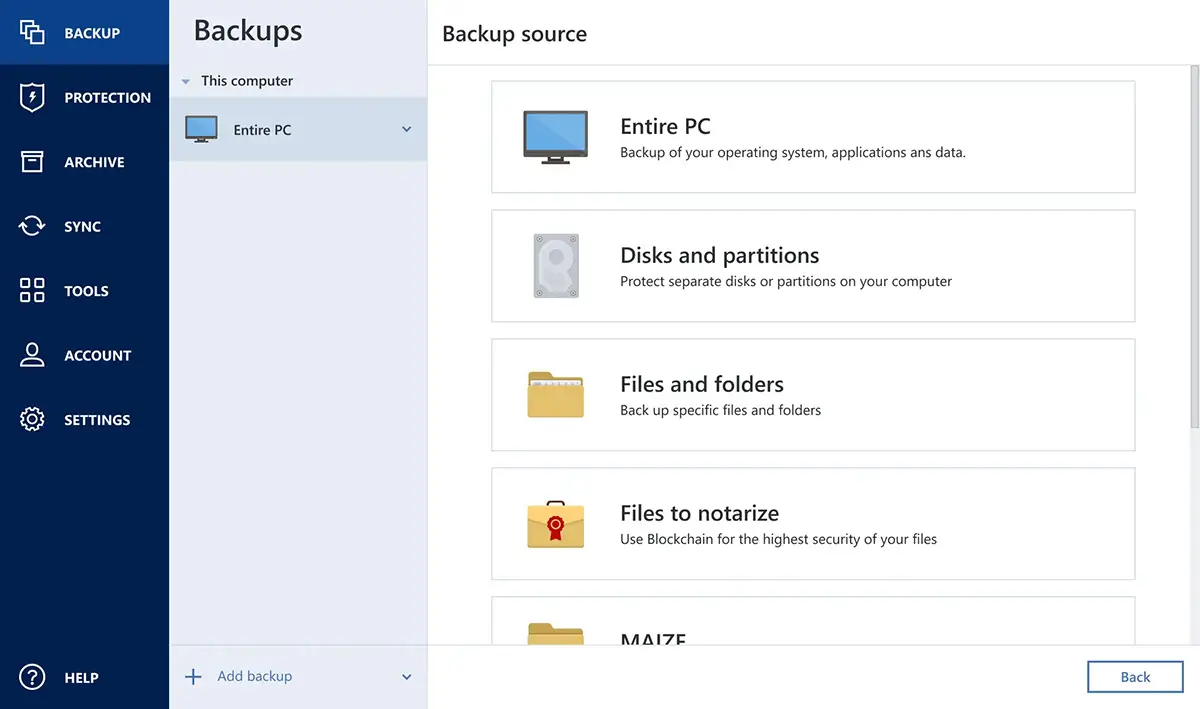
One of the major advantages of Acronis True Image is its intuitive interface. The software’s dashboard is simple and straightforward, making it easy for users of all technical levels to perform full-system backups, schedule tasks, and restore files. Users can also monitor their backup and security status at a glance, which streamlines the backup process and minimizes technical hurdles.
Acronis True Image Plans
Acronis True Image offers three distinct plans—Essentials, Advanced, and Premium—each designed to provide varying levels of data protection, storage, and security features. Essentials covers core local backup and recovery needs, while Advanced adds cloud storage, real-time anti-malware, and Microsoft 365 backup for a more comprehensive solution. For users needing extensive cloud storage and advanced document authentication, the Premium plan includes up to 5TB of cloud storage, blockchain-based notarization, and electronic signature capabilities.
Acronis True Image Plans – Details & Pricing
Why Choose Acronis True Image?
Acronis True Image stands out as a personal backup solution that not only meets but exceeds the needs of everyday users. With a combination of traditional backup options, system-level protection, and integrated cybersecurity features, Acronis True Image provides robust protection in a single platform. This makes it an excellent choice for individuals who want to secure their digital life comprehensively without needing multiple solutions.
Acronis True Image – All Features
Acronis Business Products: Cybersecurity and Deployment Solutions
For businesses, Acronis offers a range of specialized products designed to protect, manage, and secure corporate data. Two of its flagship business products are Acronis Cyber Protect and Acronis Snap Deploy. Here’s a deeper look at these solutions, along with a brief overview of other offerings in the Acronis suite.
Acronis Cyber Protect
Acronis Cyber Protect is a unified solution that integrates backup, disaster recovery, and cybersecurity in one platform, specifically designed to meet the needs of small to large businesses. This all-in-one approach addresses the increased complexity of cybersecurity and data management in today’s corporate environments, where cyber threats are constantly evolving.
Key Features of Acronis Cyber Protect
- Integrated Cybersecurity and Backup
Cyber Protect combines traditional data backup with cybersecurity, offering a unique approach that secures data against both data loss and cyber threats. This fusion of backup and anti-malware technology enables proactive defense against ransomware, malware, and phishing attacks, making it easier for businesses to manage their data security needs within a single solution. - AI-Powered Threat Detection
Acronis Cyber Protect employs advanced AI-driven technology to detect and neutralize emerging threats. It continuously scans for unusual activity and can block suspicious behavior before it impacts a business’s data. The integration of AI significantly enhances its effectiveness in identifying complex threats, including zero-day vulnerabilities. - Advanced Data Recovery
In case of a system failure or data corruption, Acronis Cyber Protect enables businesses to restore data quickly and efficiently. The solution supports flexible recovery options, including full system recovery, file-level restoration, and granular recovery of individual applications, minimizing downtime and ensuring continuity. - Centralized Management and Automation
Cyber Protect’s centralized management console makes it easy for IT administrators to monitor the health of their network, automate backups, and respond to security threats in real time. Automation features, such as scheduled backups and auto-updates, reduce the administrative burden on IT teams and enhance productivity. - Comprehensive Compliance and Reporting Tools
For industries with strict regulatory requirements, Acronis Cyber Protect provides compliance-friendly features, including detailed reports and audit logs, which help businesses meet data protection regulations like GDPR, HIPAA, and more.
Acronis Snap Deploy
Acronis Snap Deploy is a powerful solution for businesses needing to deploy operating systems quickly and efficiently across multiple devices. It is ideal for organizations that manage large fleets of computers or need to roll out new systems rapidly.
Key Features of Acronis Snap Deploy
- Rapid Deployment
Snap Deploy allows for quick, simultaneous deployment of an operating system to multiple computers. This functionality is beneficial for organizations like educational institutions, where large-scale, uniform deployments are often required. - Hardware Flexibility
The software provides hardware-independent imaging, meaning that a single system image can be deployed to different hardware setups. This flexibility simplifies the deployment process across varied hardware configurations within an organization. - Efficient Remote Management
Acronis Snap Deploy supports remote management, allowing IT teams to deploy and configure systems from a centralized console. This remote capability saves time and reduces the need for IT staff to be physically present at each device. - Automatic Re-deployment and Customization Options
Snap Deploy also includes options for automatic re-deployment, ideal for lab environments where systems need to be periodically reset. Customizable deployment options enable administrators to set up default settings, ensuring consistency across devices.
Additional Business Solutions
In addition to Cyber Protect and Snap Deploy, Acronis offers several other products that cater to a variety of business needs:
- Acronis Cyber Backup: A traditional backup solution that provides secure and reliable data protection, suitable for businesses looking for data retention without additional cybersecurity features.
- Acronis Disaster Recovery: A comprehensive disaster recovery solution that helps businesses recover critical systems in the event of a major incident, ensuring business continuity with minimal downtime.
- Acronis Files Advanced: Designed for secure file sync and share, Files Advanced allows employees to collaborate safely while maintaining data security.
- Acronis Notary: A blockchain-based solution that ensures the integrity and authenticity of files by adding a time-stamped certificate to each document, making it an ideal tool for regulatory compliance.
Why Businesses Choose Acronis
Acronis’ business solutions are favored for their comprehensive capabilities and ease of integration. Cyber Protect’s combined cybersecurity and backup functionalities and Snap Deploy’s efficient OS deployment make Acronis an attractive choice for IT professionals. Additionally, Acronis’ emphasis on automation, centralized management, and remote capabilities further boosts its appeal, allowing businesses to secure, manage, and streamline their data protection efforts with minimal complexity.
In summary, Acronis offers a complete range of solutions that enable businesses to address all aspects of data protection and cybersecurity. From proactive threat prevention to rapid system deployment, Acronis ensures that organizations can operate smoothly and securely in a constantly evolving digital landscape.
Acronis – Summary
Acronis stands out as a trusted provider of advanced cybersecurity and data protection solutions, offering robust tools for both individual and business users. With products like Acronis True Image for personal backup and Acronis Cyber Protect for comprehensive business security, Acronis combines ease of use with powerful features like AI-driven malware detection, cloud backup, and rapid system recovery. These solutions not only safeguard data but also enhance operational efficiency through automation and centralized management.
Whether you’re an individual looking to protect personal files or a business aiming to secure critical systems, Acronis delivers reliable, high-performance options that adapt to modern digital challenges. Emphasizing proactive security and streamlined data management, Acronis enables users to confidently protect and manage their information, no matter the scale of their needs.