Acronis True Image
Acronis provides comprehensive cybersecurity, backup, and data protection solutions, integrating advanced security features with reliable recovery options for individuals and businesses.
A Comprehensive Guide to Acronis True Image
(Windows® | macOS® | iOS® | Android™)
Acronis True Image is a comprehensive personal backup and data protection solution designed to secure your digital life from data loss and cyber threats. Known for its ease of use and advanced features, Acronis True Image offers a reliable way to protect, recover, and safeguard everything from operating systems and applications to personal files and media. It’s an ideal choice for individuals seeking a powerful, all-in-one solution that combines traditional backup functionality with proactive cybersecurity.
What Is Acronis True Image?
Acronis True Image is more than just a backup tool; it’s a complete digital safety net for individuals. This software allows users to create full system backups, clone hard drives, and ensure that important files are securely stored. With a blend of local and cloud-based options, Acronis True Image gives users the flexibility to safeguard their data however they prefer, whether on external drives, network storage, or Acronis' cloud service.
Unlike many backup solutions, Acronis True Image integrates cybersecurity features to protect data from threats like ransomware, malware, and phishing attacks. With real-time protection and advanced malware detection, Acronis True Image helps ensure that not only is your data recoverable, but it’s also continuously protected. This dual approach to data protection makes Acronis True Image a standout choice for those who need reliable and secure backups without compromising their security.
Acronis True Image Plans
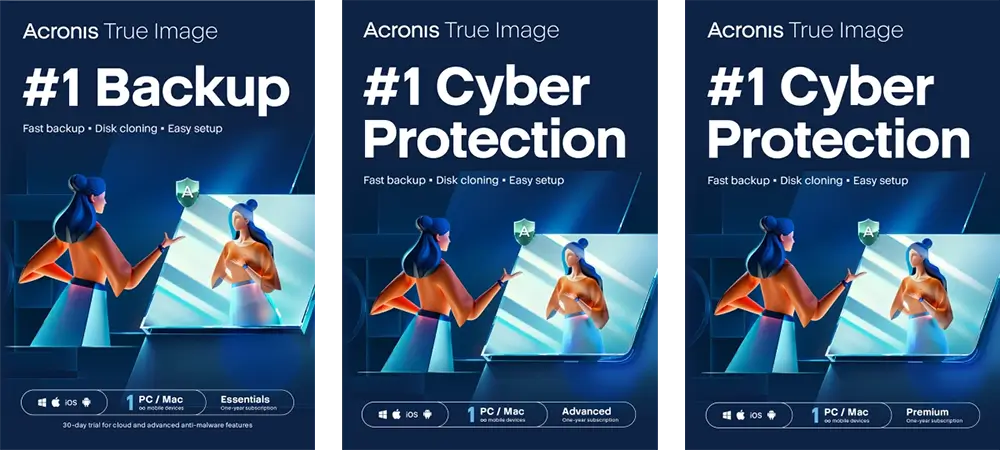
Acronis True Image offers three tailored plans—Essentials, Advanced, and Premium—each designed to meet a variety of data protection needs for both individual and multi-device users. The Essentials plan provides core backup and recovery features, including local backup, disk cloning, ransomware protection, and support for up to five PCs or Macs along with unlimited mobile devices. The Advanced plan builds on these features by adding secure cloud storage, beginning with 50GB, along with real-time anti-malware protection, Microsoft 365 backup, and the ability to perform cloud-to-local backups and restores. The Premium plan takes data protection a step further, offering 1TB of cloud storage with options to expand up to 5TB, along with blockchain notarization and electronic signature capabilities for enhanced document authenticity and security.
Each plan includes Acronis’ user-friendly cyber protection dashboard and tray notification center, making it easy for users to monitor and manage their backup and security settings. With options for both local and cloud-based protection, Acronis True Image plans cater to users seeking reliable data security, flexible backup options, and multi-layered cybersecurity. Whether users need basic protection, cloud flexibility, or advanced features like document notarization and electronic signatures, Acronis True Image plans offer a comprehensive solution to fit their data protection requirements.
Acronis True Image Features
Acronis True Image offers a wide range of features to safeguard your data, from full backup and recovery to integrated cybersecurity and identity protection. This all-in-one solution addresses every aspect of personal data security, making it ideal for users who want comprehensive protection without managing multiple programs. Below are some of the key features that make Acronis True Image a powerful solution.
Backup & Recovery
Acronis True Image’s Backup & Recovery features are at the core of its functionality, providing users with an efficient and secure way to protect their data. The software offers full image backups, allowing you to save an exact replica of your entire system, including operating system, applications, and personal files. Users can also perform incremental and differential backups, which only capture changes made since the last backup, saving both time and storage space. Additionally, Acronis supports automatic scheduling and versioning, ensuring that your data is consistently backed up without the need for manual intervention. Acronis True Image's Backup & Recovery capabilities are extensive, offering a range of options to cover virtually every backup need. Below is a breakdown of each feature that makes Acronis True Image one of the most versatile and secure backup solutions available.
Full Image Backups
With full image backups, Acronis True Image enables users to create an exact snapshot of their entire system, capturing the operating system, applications, settings, and personal files. This comprehensive backup method is invaluable in cases of complete system failures, as it allows users to restore their entire system to its previous state without reinstalling applications or reconfiguring settings.
Real-Time Disk Cloning
Acronis True Image provides real-time disk cloning, allowing users to replicate their hard drive or SSD even while the operating system is running. This feature is ideal for upgrading hardware or creating an exact copy of a system drive without needing to shut down, ensuring seamless continuity.
Selective File and Folder Backups
For users who don’t need a full system backup, Acronis True Image offers selective file and folder backups. This feature allows users to pick specific files and folders to back up, saving both time and storage by focusing on essential data rather than an entire system image.
Microsoft 365 Backup
Acronis True Image extends its backup capabilities to Microsoft 365 accounts, covering emails and attachments in Outlook.com and files in OneDrive. This ensures that users’ cloud-based documents and communications are safely stored and recoverable, offering extra security for critical personal or business data stored within Microsoft’s ecosystem.
Local Backup
Local backup is an essential feature for users who prefer to keep their data stored on external hard drives, network-attached storage (NAS), or other local devices. This method provides a fast, easy way to access and recover data without relying on internet connectivity, making it suitable for quick restores.
Cloud Backup
For added security, Acronis True Image supports cloud backups to Acronis' secure cloud storage. Cloud backup provides an additional layer of data protection, ensuring that files are safe even if local storage devices are damaged or lost. Cloud backups are accessible from anywhere, offering users convenience and peace of mind.
Automated Backups
Automated backups allow users to set up a schedule that fits their needs, whether daily, weekly, or continuously in real-time. Once configured, Acronis True Image takes care of the backup process without requiring any manual action, ensuring data is always up to date.
Mobile Backup
Acronis True Image includes mobile backup options for iOS and Android devices. Users can back up their photos, videos, contacts, and calendars to their computer or directly to the Acronis Cloud, ensuring that mobile data remains protected and recoverable.
Backup Replication
Backup replication lets users automatically create additional copies of their backups. For instance, a local backup can be automatically replicated to the Acronis Cloud, adding an extra layer of redundancy and enhancing data security.
Data Migration for PC and Mac
Acronis True Image simplifies the process of moving data from one device to another. Whether switching to a new computer or transferring data between a PC and Mac, the software’s data migration feature ensures a smooth and reliable transfer of files, settings, and applications.
Dual Protection (3-2-1 Backup Rule)
Acronis True Image follows the industry-standard 3-2-1 backup rule: keeping three copies of data (one primary and two backups), with two on different storage types and one offsite. This “dual protection” approach ensures that users always have accessible copies of their data, minimizing the risk of total data loss.
Acronis Survival Kit
The Acronis Survival Kit is a unique tool that creates a bootable recovery drive with a full system image backup. In the event of a system crash or hardware failure, users can use this kit to boot their computer and restore their system entirely, even if it cannot start on its own.
End-to-End Encryption
End-to-end encryption ensures that all backups created with Acronis True Image are fully protected, both in transit and at rest. Using AES-256 encryption, Acronis True Image guarantees that only authorized users can access their data, providing a high level of security against unauthorized access and potential data breaches.
Cybersecurity
Acronis True Image goes beyond traditional backup by incorporating a comprehensive suite of cybersecurity features designed to protect users from a wide range of digital threats. These capabilities ensure that data is not only recoverable but also shielded against attacks, giving users peace of mind that their information remains secure at all times. Below are the primary cybersecurity features embedded within Acronis True Image.
Real-Time Anti-Malware Protection
Acronis True Image includes robust anti-malware protection, which actively scans the system for viruses, ransomware, and other malicious software. This real-time protection layer leverages advanced AI-based technology to detect and neutralize known and emerging threats before they can compromise data. Acronis regularly updates its malware detection algorithms, ensuring that users are protected against the latest cyber threats, including zero-day attacks.

Advanced Ransomware Protection with Active Protection
Ransomware attacks have become one of the most common and damaging types of cyber threats. Acronis True Image’s Active Protection technology offers advanced defense against ransomware by monitoring for unusual file modification behaviors. If it detects suspicious activity that resembles ransomware encryption, Acronis Active Protection automatically blocks the process and notifies the user. Additionally, it can instantly restore any affected files, preventing data loss and ensuring that users don’t have to pay ransoms to regain access to their information.
Cryptomining Blocker
Cryptomining malware, also known as cryptojacking, is a growing threat where malicious software secretly uses system resources to mine cryptocurrency, causing performance slowdowns and potential hardware damage. Acronis True Image’s cryptomining blocker detects and stops unauthorized cryptomining attempts, helping to preserve system resources and ensuring optimal device performance.
AI-Powered Behavioral Detection
Acronis True Image employs AI-powered behavioral detection to identify suspicious behavior that could indicate malware or other harmful software. By analyzing the typical patterns and actions associated with malware, this AI-based technology can proactively recognize and block new types of threats that might otherwise evade traditional signature-based detection methods. This helps keep the system secure even from unknown or emerging threats.
Vulnerability Assessments and Patch Management
Acronis True Image offers a built-in vulnerability assessment tool that scans the system for outdated or unpatched software that could serve as entry points for attackers. In addition to identifying vulnerabilities, the software also includes patch management to keep third-party applications up-to-date, further reducing the risk of exploitation by cybercriminals.
Web Filtering and Protection
Acronis True Image includes web filtering capabilities that help prevent users from visiting malicious or compromised websites. This feature blocks access to websites known for hosting phishing attempts, malware, or other security risks. By filtering harmful web content, Acronis True Image reduces the likelihood of users inadvertently downloading malware or falling victim to phishing attacks.
Antivirus and Anti-Malware Scanning
Acronis True Image combines backup with antivirus and anti-malware scanning, allowing users to schedule regular system scans or conduct on-demand scans of specific files and folders. This dual functionality ensures that both data and system health are continuously monitored, giving users a holistic solution for backup and cybersecurity without needing separate software for each task.
Reliable Self-Defense Mechanism
To ensure the reliability of its security features, Acronis True Image includes a self-defense mechanism that protects the software itself from tampering. Some advanced malware strains attempt to disable security software to make the system more vulnerable, but Acronis has built-in protective layers that prevent such interference, ensuring the software remains fully operational and effective against threats.
Real-Time Protection Notifications and Reporting
Acronis True Image keeps users informed about their security status with real-time notifications and detailed reports. If any malicious activity is detected, users receive immediate alerts, enabling them to take prompt action if necessary. Additionally, the software provides in-depth reports on past security events, making it easier to review and understand the types of threats blocked and the level of protection provided.
These cybersecurity features in Acronis True Image make it a robust solution that not only backs up data but actively safeguards it from threats. By integrating proactive malware protection, ransomware defense, and advanced threat detection, Acronis True Image provides users with comprehensive cybersecurity tools to protect their digital life.
Acronis True Image Plans – Details & Pricing
Identity Protection
Acronis True Image includes an array of identity protection features aimed at safeguarding users’ personal information against theft and misuse. With identity theft on the rise, this suite of tools provides essential protection for sensitive information such as passwords, email addresses, and other personal details, ensuring users can navigate their digital lives with confidence. Below are the primary features within Acronis True Image’s identity protection capabilities.
Dark Web Monitoring and Alerts
One of the standout features of Acronis True Image’s identity protection is its dark web monitoring service. This tool continuously scans the dark web for any traces of the user’s personal information, such as email addresses, login credentials, and financial data. If any sensitive information is detected in data breaches or illegal trading sites, Acronis immediately notifies the user, enabling prompt action to secure their accounts. These real-time alerts give users the chance to change compromised credentials and prevent potential misuse before it escalates.
Secure Password Manager
Acronis True Image includes a secure password manager to help users create, store, and manage strong passwords for all their accounts. The password manager generates unique, complex passwords that are challenging for attackers to guess or crack, significantly reducing the risk of unauthorized account access. Additionally, users can securely store all their passwords in one place, eliminating the need to remember multiple logins and ensuring sensitive data is organized and accessible only to them.
Identity Theft Resolution Assistance
In the unfortunate event that identity theft does occur, Acronis True Image offers identity theft resolution assistance. This service provides expert support to help users navigate the recovery process, from disputing fraudulent charges to restoring accounts and securing compromised information. This assistance can make a complex and stressful experience more manageable, helping users restore their digital identity with less hassle.

Privacy Tools for Secure Browsing
To further enhance identity protection, Acronis True Image offers privacy tools designed to secure users’ online browsing activities. These tools block trackers and protect personal data from being collected and used by third parties. By keeping users’ browsing data private, Acronis helps prevent unauthorized tracking and minimizes exposure to phishing schemes and other identity-targeted attacks.
Real-Time Account Monitoring
Real-time account monitoring is another critical feature within Acronis True Image’s identity protection suite. This feature monitors important online accounts for unauthorized login attempts and suspicious activity. If unusual behavior is detected, such as a login attempt from an unfamiliar device or location, Acronis alerts the user, allowing them to take immediate action, such as changing passwords or enabling additional security measures.
Data Privacy Insights and Reporting
Acronis True Image provides users with comprehensive insights into their data privacy. These reports offer a clear view of recent identity protection activity, showing potential risks and past breaches. By understanding how their information is being exposed and protected, users can make informed decisions about their digital behavior and strengthen their security practices where necessary.
With these identity protection features, Acronis True Image offers more than just data backup—it provides a proactive defense against the growing risk of identity theft. By combining dark web monitoring, secure password management, and privacy tools, Acronis True Image empowers users to take control of their personal information and ensure that their identity remains safe in an increasingly connected world.
Additional Features in Acronis True Image
Beyond its core backup, recovery, and cybersecurity offerings, Acronis True Image includes a range of additional solutions tailored to meet specific needs. These features enhance the functionality of the software, offering specialized tools for gamers, photo enthusiasts, and users requiring secure document signing. Below are the unique features available in Acronis True Image’s additional solutions.
Gaming Security
Acronis True Image’s Gaming Security feature is designed specifically for gamers, addressing the unique challenges they face, such as protecting game files and ensuring minimal system interference during gameplay. Gaming Security shields gamers from malware, ransomware, and other threats that could corrupt saved games, game libraries, or gaming platforms. It includes an optimized antivirus engine that operates silently in the background, ensuring that protection remains active without affecting system performance or disrupting gameplay. This feature is ideal for both casual and professional gamers who want to safeguard their gaming data without compromising speed or performance.
Cloud Photo Storage
For users who rely heavily on digital photography, Acronis True Image offers Cloud Photo Storage, a dedicated space for securely storing and organizing photos. This feature provides users with ample storage in the Acronis Cloud, where they can back up and access their photo libraries from anywhere. Cloud Photo Storage helps users keep their memories safe from accidental loss, device damage, or theft, ensuring that their photos are available across multiple devices. With automatic photo backups and the ability to retrieve images at any time, this solution is ideal for photographers and anyone who values secure, reliable storage for their images.
Electronic Signature (Acronis ASign)
Acronis True Image also includes Acronis ASign, an electronic signature solution that simplifies document signing while ensuring security and compliance. With ASign, users can sign important documents digitally, allowing for faster, more efficient approvals without the need for physical paperwork. Acronis ASign provides legally binding electronic signatures that are easy to create and track, making it especially useful for users in need of secure, verifiable signatures for contracts, agreements, and other official documents. This tool ensures that documents are tamper-proof and secure, giving users confidence in the authenticity and integrity of their signed documents.
These additional solutions in Acronis True Image further expand its functionality, catering to specific needs like gaming security, photo storage, and document signing. By addressing these unique requirements, Acronis True Image enhances its value as an all-encompassing digital protection solution for users with diverse needs.
Easy Management through a User-Friendly Interface in Acronis True Image
Acronis True Image is designed with ease of use at its core, featuring an intuitive and accessible interface that allows users of all technical levels to navigate and manage their data protection. The software’s layout and simplified controls make it easy to access essential backup, recovery, and security tools, ensuring that users can protect their data without complications. Below are some key elements that enhance the usability of Acronis True Image.
Intuitive User Interface
The Acronis True Image interface is clean, modern, and easy to navigate, providing users with a straightforward experience from setup to daily use. The dashboard is designed to present critical functions—like backup, recovery, and security—in a visually organized format, allowing users to access all tools and monitor their protection status at a glance. Whether adjusting backup settings, running malware scans, or checking recent activity, the intuitive interface makes it simple for users to maintain their data protection effortlessly.
One-Click Backup
For those who need quick, hassle-free data protection, Acronis True Image offers a one-click backup option. This feature allows users to initiate a full system backup with a single click, automatically backing up all essential data, including operating systems, files, applications, and settings. One-click backup is especially convenient for users who want comprehensive coverage without spending time on manual configurations, providing a streamlined experience that saves time while ensuring complete data safety.
Automatic Protection
Acronis True Image’s automatic protection feature ensures that backups are consistently up-to-date without requiring users to manually initiate them. By setting a backup schedule—such as daily, weekly, or even continuous real-time backups—users can rely on Acronis to manage their data protection automatically. This feature is invaluable for busy individuals who may not remember to back up their files regularly, offering peace of mind that data is always current and recoverable.
Web-Based Console
The web-based console in Acronis True Image gives users centralized control over their backup and cybersecurity functions from any browser, providing flexibility and accessibility. Through this console, users can initiate backups, check the status of their data protection, and adjust settings remotely. The web-based console is particularly useful for users who manage multiple devices or want to oversee their data security while on the go, allowing for seamless access to all backup functions from anywhere with an internet connection.
Remote Management Features
For users with multiple devices, Acronis True Image includes robust remote management capabilities. This feature allows users to manage and monitor backup and security settings across devices from a single location, simplifying data protection for households or small teams. Through the remote management tools, users can oversee backups, initiate or cancel processes, and adjust security settings without needing physical access to each device. This centralized management option streamlines data security for users with complex setups, enhancing both convenience and control.
The user-friendly management features in Acronis True Image ensure that data protection is not only powerful but also accessible. With an intuitive interface, one-click backups, automated protection, and remote management options, Acronis True Image provides a seamless experience that empowers users to protect their digital life with minimal effort.