
Norton 360 Deluxe – Protection for 5 Devices
Norton 360 Deluxe – Instant Discount Deals – Save 60%*
Norton 360
Standard
- Protection for 3 devices
- Includes Secure VPN
- Windows, Mac OS X, Android, iOS
- Immediate Download
- 2GB Cloud Backup
Norton 360
Deluxe
- Protection for 5 devices
- Includes Secure VPN
- Windows, Mac OS X, Android, iOS
- Immediate Download
- 50GB Cloud Backup
- Parental Control
- Privacy Monitor
Norton 360
Premium
- Protection for 10 devices
- Includes Secure VPN
- Windows, Mac OS X, Android, iOS
- Immediate Download
- 100GB Cloud Backup
- Parental Control
- Privacy Monitor
Features: Real-time Threat Protection, Smart Firewall, Secure VPN, Dark Web Monitoring, Password Manager, SafeCam
For Norton 360 with LifeLock, check the Norton 360 with LifeLock page.

Other Norton Products and Services
For more information visit Norton.com
Norton 360 Deluxe – Protection for 5 PCs, Macs, Tablets, or Phones
Norton All-In-One Protection
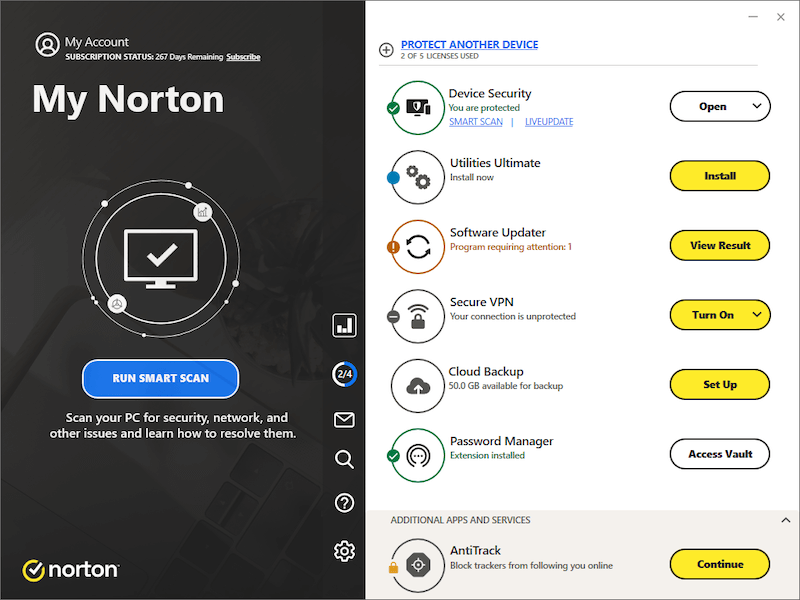
Screen is for demonstration purposes and subject to change.
Norton 360 Deluxe provides you with powerful layers of protection for your connected devices, personal information and identity. Up to 5 devices: PCs, Macs, tablets, and smartphones are protected against viruses, ransomware, malware, and other online threats as you bank, shop and post online.
Your personal information has protection when sent or received through your devices both at home and on-the-go with bank-grade encryption from our Secure VPN. It helps block cybercriminals from accessing your personal information when connecting to any Wi-Fi, even public Wi-Fi.
With Dark Web Monitoring Powered by LifeLock, the dark web is scanned for your personal information and you’re notified if it’s found.
Norton 360 also includes always-there member support by Norton experts, 50 GB of Cloud Backup as a preventative measure to data loss due to hard drive failures and ransomware, and Password Manager to securely manage your passwords and logins.
Should the unexpected happen, you’ll be covered with Norton's Virus Protection Promise to help remove any virus or your money back.
The software is designed to provide you multiple layers of protection for your connected devices, online privacy and identity. Norton 360:
- Helps detect threats to your devices, identity or other personal information on the dark web and when online as you post, bank, and shop
- Defends your personal information by securing your devices and online connections from cybercriminals, both at home and on-the-go
- Notifies you to suspicious activity by email
- Resolves issues to help keep your device(s) virus-free or we’ll refund your subscription
What Comes Included with Norton 360 Deluxe?
With Norton 360 Deluxe you get:
- Protection for up to 5 devices: PCs, Macs, mobile devices or tablets
- Smart Firewall
- Password Manager
- Virus Protection Promise
- Cloud Backup – 50 GB
- Parental Control
- Secure VPN for up to 5 PCs, Macs, or Mobile devices
- SafeCam
- Dark Web Monitoring Powered by LifeLock
Norton 360 Deluxe Benefits
- Device Security: Real-time protection for up to 5 devices: PCs, Macs, smartphones or tablets against ransomware, viruses, spyware, malware and other online threats
- Online Threat Protection: Advanced security helps protect your private and financial information when you go online
- Smart Firewall: Helps protect your device and your data from malicious attacks and intrusive eyes by monitoring and blocking suspicious network traffic
- Cloud Backup: 50 GB of cloud storage as a preventative measure to data loss due to hard drive failures, stolen devices and even ransomware
- Secure VPN: Access your favorite apps and websites when connecting to Wi-Fi at home or on-the-go with the reassurance of bank-grade encryption
- Password Manager: Create, store, and manage your passwords, credit card information and other credentials online – safely and securely
- Parental Control: Parental tools to help your kids safely explore the Internet
- Virus Protection Promise: Norton's experts are available to help keep your devices virus-free, or your money back
- Dark Web Monitoring powered by LifeLock: LifeLock monitors and notifies you if they find your personal information on the dark web
Norton 360 Deluxe Features and Benefits
Real-time Threat Protection
Post, bank and shop from your device. Norton will keep it secure.
Norton Security brings real-time protection for your PCs, Macs, smartphones or tablets against ransomware, viruses, spyware, malware and other online threats, monitors and blocks unauthorized traffic, and helps protect your private and financial information when you go online.
Secure VPN
The freedom to Securely Wi-Fi anywhere.
With a single click, Norton Secure VPN gives you the power to secure your connection each time you go online, even with public Wi-Fi. Your personal information is encrypted, preventing cybercriminals from intercepting your connection and gaining access to your valuable, personal information.
Password Manager
Safeguard all your passwords.
Passwords written on a sticky note or the same password used for every account may make your personal information vulnerable. Norton Password Manager provides the tools you need to create, store, and manage every password, your credit card information and other credentials online – safely and securely in your very own encrypted, cloud-based vault.
Secure Cloud Backup
Last line of defense from ransomware.
Computers, tablets, and mobile devices store many cherished and important documents from family photos to resumes to tax returns. Norton Cloud Backup provides a safe and secure cloud-based storage to store important files and documents as a preventative measure to data loss due to hard drive failures, stolen devices and even ransomware. Depending on your chosen plan, Norton offers protected cloud backup to use for storing your valuable files.
PC SafeCam
Safeguard the other window into your home.
Your webcam lets you keep in close contact with family, friends or colleagues but can be vulnerable to attack, giving cybercriminals an up-close view into your home, your daily routine, and personal information. Norton SafeCam alerts you to attempts to access your webcam and blocks those who are not authorized to access it.
Parental Control
Help your kids safely navigate their connected world.
Included in Norton 360 Deluxe, Norton 360 Premium, and all Norton 360 with LifeLock bundles. Parental Control help protect your kids from online predators by highlighting your kids’ online activity and identifying potential dangers before they become problems. Easy-to-use tools allow you to set screen time limits, block unsuitable sites, monitor search terms and overall activity history.
Dark Web Monitoring Powered by LifeLock
LifeLock patrols the dark web and notifies you of potential threats.
Cybercriminals can meet anonymously on dark web sites to make illegal purchases of personal information. Dark Web Monitoring Powered by LifeLock™ continuously patrols the dark web and private forums looking for personal information. Norton sends you notifications should it be found.
100% Virus Protection Promise
100% virus protection guarantee.
Keeping your devices free from viruses is at the heart of what Norton does. In fact, Norton is so confident in their antivirus and malware protection, it’s guaranteed. Should your device become infected by a virus, Member Services & Support are on-call to help. If they can’t remove the virus, you get your money back.
Norton 360 Deluxe Feature Descriptions
Computer Security – Mac & PC
Online Threat Protection
Norton's advanced security and 24-hour threat monitoring across the globe work to outsmart thieves and help stop the latest attacks before they reach your device.
- Advance security to help protect your private and financial information when you go online
- Helps protect you against cybercriminals attempting to steal your private and financial information, and take over your device
- Helps shield you from scammers while you surf, bank, socialize, and shop online
- Browse the web confidently knowing your device is protected from unsafe links, malicious downloads, and virus-ridden websites
- Helps block viruses that can damage your files and render your device useless
- Helps you identify and shut down applications that harm your computer’s performance and stability
- NortonLifeLock solutions are powered by one of the world’s largest civilian cyber intelligence networks allowing us to help protect against advanced online threats
- Updates are pushed automatically so your device is always up to-date
Computer Security – Mac
Anti-phishing Protection
Blocks fraudulent versions of legitimate websites that are set up by online scammers to steal your money, passwords, and identity.
Automatic Protection
Checks for security risks every time you use a program on your Mac, insert removable media, or access the Internet.
Smart Firewall
Helps protect your personal files and data on your device by monitoring and blocking suspicious network traffic. Prevents your Mac from revealing its existence to other computers that try to connect to your Mac.
Intrusion Prevention
Analyzes information arriving from the network and blocks potential threats before they hit your computer.
Safe Search
Provides a Norton safety rating with search results.
Safe Web
Proactive protection assists you while you surf the web by alerting you to unsafe websites before you visit them.
Power Eraser
Detects potentially unwanted applications and lets you remove them.
Computer Security – PC
Anti-Phishing
Protection Helps protect against online scammers stealing your money, passwords and personal information by blocking fraudulent versions of legitimate websites set-up by scammers.
Auto-protection
Scans for viruses and other potential threats during activities which could pose a risk to your system.
Behavioral Protection (SONAR)
Monitors applications for suspicious behavior and automatically blocks found threats.
Boot-time Protection
After installed, provides enhanced security from the moment you start your computer.
Browser Protection
Detects and blocks threats attempting to exploit vulnerabilities in your browser.
Disk Optimization
Automatically checks your permanent disks for fragmentation and optimizes them if they are more than 10 percent fragmented.
Download Insight
Uses reputation information to help protect your device from potentially dangerous applications before you download and install them.
Email Protection
Blocks viruses and other security threats from your email.
Emulator
Checks suspicious files in an isolated protected virtual environment to see how they act before allowing them to be run on your device.
File Cleanup
Removes unwanted files in Windows Temporary folders.
File Insight
Provides information about the reputation of files on your computer as well as those files which are excluded from scans based on their trust level.
Generic Exploit Mitigation
Helps protect against ‘zero-day’ attacks that exploit vulnerabilities in applications or the operating system.
Intrusion Prevention
Analyzes information arriving from a network and blocks potential threats before they hit your computer.
Optimize Boot Volume
Optimizes your boot volume to improve the startup time of your computer.
Power Eraser
Helps detect and remove high-risk applications and malware that may be residing on your computer.
Reputation Protection (Insight)
Uses the reputation information gathered from one of the world’s largest civilian cyber intelligence networks to classify virtually every software application file on the planet.
Safe Search***,12
Provides a Norton safety rating with search results.
Safe Web***
Protects you while you surf the web by alerting you to unsafe websites before you visit them.
Scam Protection
Warns you about potential problems with a website before you enter your personal or financial information.
Silent Mode
Suspends alerts and updates to avoid interrupting or slowing games and movies.
Smart Firewall
Helps protect your device and your data from malicious attacks and intrusive eyes by monitoring and blocking suspicious network traffic.
Spam Protection
Blocks spam and other unsolicited messages.
Startup Manager
Monitors and lists the programs that automatically start when you turn on your computer. Programs can be turned off or delayed, to improve computer startup time.
System Insight
Displays how applications have affected your computer’s performance.
Mobile Security – iOS & Android
Mobile devices need security too. Cybercriminals continue to develop stealthy new threats for mobile devices – threats that can spy on your location information, steal your passwords or damage your device. Norton Mobile Security helps keep your data on lockdown, so you can go mobile without worry.
Android Features
- Stop malicious apps with exclusive threat-detecting technology
- Go online with an on-the-go traveling security solution
- Find a lost device quickly
- Stop annoying calls and mobile spam
App Advisors
Two great App Advisor features to help protect your Android device. App Advisor for Google Play proactively scans apps before you download them and warns you in advance of any risky behaviors. While App Advisor for existing apps, scans all your current apps and any updates to apps on your device. Both features scan for threats like malware, ransomware, adware, and privacy leaks using Norton's award-winning, patent-protected app scanning technology.
App Advisor for Google Play
Helps protect your Android device by scanning apps before you download them and warns you about risky apps before you install them.
Scans apps for:
- Excessive battery & data usage
- Intrusive adware
- Proactive Malware Blocker
- Privacy risks
- Unusual behavior
App Advisor
Helps protect your smartphone by scanning existing apps and app updates on your device for online threats like malware, ransomware, adware, and privacy leaks using a patent-protected app scanning technology.
Call Blocking
Allows you to automatically block calls from specific phone numbers or unknown numbers. Allows you to filter known or unknown calls.
Free 24x7 Support
Includes free 24x7 chat and phone support for a period of one year from initial product installation.
Norton Mobile Insight
A unique app-intelligence system that powers the Norton Mobile Security App Advisor feature and is continuously updated with threat information to protect your device and personal information from risky apps.
Safe Search
Exclusive in app search engine connects to one of the world’s largest civilian cyber intelligence networks allowing us to flag unsafe sites right in your search results.
Spam and Fraud Call Alerts
Helps you identify, report and block annoying known robocall numbers who often use schemes devised to trick you into providing your personal information.
Web Protection
Helps protect your device and your personal data from malicious sites that install ransomware, trojans and other threats. Automatically blocks fraudulent (phishing) websites to help protect your device and personal information from unsafe links in emails, text messages, apps, and QR codes.
Wi-Fi Security
Uses advanced scanning technology to help detect and alert you if your device is connected to a Wi-Fi network that is under attack.
iOS Features
- Go online with an on-the-go traveling security solution
- Stop annoying calls and mobile spam
System Advisor
Checks for the latest security patches and OS updates, which helps ensure everything is in place to help protect personal information.
Web Protection
Protects your device against online scams, malicious content and phishing attacks by warning you about fraudulent websites, links and potentially suspicious sites before you visit them regardless of the browser, app or email program you are using.
Wi-Fi Security
Uses advanced scanning technology to help detect and alert you if your device is connected to a Wi-Fi network that is under attack.
Cloud Backup
Help protect your important files and documents as a preventative measure to data loss due to hard drive failures and even ransomware. Norton will automatically find the photos, music, movies and documents you want to back up from your Windows PC, and securely store them in the cloud.
- Sets up in minutes and runs automatically
- Stores files in the cloud with redundancy for added protection
- Secures your data with bank-grade encryption and professionally-managed offsite file security
- Lets you access and restore files from any Web-enabled PC
- Search your backup sets by keyword to quickly find the files you want to restore
- Easily email files you have backed up to family members, friends or co-workers
- See previous versions of your files
File Purge
Allows you to select which file you want deleted from your Norton Cloud Backup.
Automatic Backup
- Saves time and effort by simplifying the process of protecting your digital files
- Once setup is complete, your files are backed up automatically
- Backs-up the files by category or folder (i.e. backup all photos or everything in a particular folder)
- Shows backups performed, pending, and completed with the status tracker
Data Encryption
Provides bank-grade data encryption to secure your data.
Email a Restore Set
Allows you to send or share files you backed up – by allowing you to specify files for download.
Files and Folder Search
Easily search for specific files or folders in backup to restore or download.
File Versioning
Keeps previous versions of files backed up in case the most recent backup is not the one that you want to restore.
Incremental Backups
Backup Multiple Computers with a single Norton Online Backup Account. Performs block-level incremental backups for faster performance. Provides one central, secured cloud location for all your photos and files across multiple Windows computers.
Managed Off-Site Storage
- Trusted leader in consumer cloud file protection who secures data for millions of consumers online
- Protects against accidental loss of data with redundant files that are distributed and stored across multiple locations
Progress Updates
Provides the list of files that are backed up and the backup status of each file.
Remote Management and Access
Allows you to quickly restore lost or deleted files to any Web-enabled computer.
Parental Control
Help protect your kids against online predators, so they can enjoy their connected world safely.
- Helps your kids explore the Web safely by keeping you informed of which sites they are visiting, and blocking harmful or inappropriate sites
- Helps your kids balance time spent online by scheduling screen-time limits for their device usage
- Provides insights into the search terms and videos that interest your kids and flags unsafe behavior, so you can discuss it with them
- Get detailed reports on what your kids are doing online, right in your Inbox or on the parent portal
Access Request
Open the lines of communication by enabling your kids to message you within Norton Family if they disagree with a blocked site or a house rule.
Activity History
See at a glance what your kids are doing on their connected devices and how much time they’ve spent on their PCs, so you can clearly spot trends and emerging habits.
Email Alerts
Find out when your kids attempt to visit a blocked site so that you can start a conversation about appropriate content.
Instant Lock
Parents can help kids take a break by locking a device, so they can re-focus, or join the family at dinner. Once in lock mode, all of the device's applications, web browsers, games, programs and more are inaccessible, until manually disabled using the Family Portal. Individual devices can be unlocked with a PIN. Parents and children can still contact each other while the device is in lock mode.
Location Supervision8
Stay informed about where your kids are with tools that map the location of their Android or iOS devices and provide a 30-day history to show where they’ve been.**,3,8
Mobile App Supervision
See which apps your kids have downloaded on their Android devices and choose which ones they can use, such as YouTube and Facebook.**
Monthly / Weekly Reports
Get detailed reports of what your kids are doing online, right in your inbox.
Parent Mobile App
Stay in the loop about your kids’ online activities from your Android mobile device and adjust settings when you’re on the go.
Search Supervision
See the words, terms, and phrases your kids are searching for to gain insights into their interests and help protect them from inappropriate content.
Time Supervision
Stay on top of how much time your kids spend on their PCs and Android devices. Foster healthier habits by scheduling specific times of the day or week each device can be used and how many hours a day can be spent on each device.
Web Supervision
Let your kids explore the web freely, with tools that block unsuitable websites while keeping you aware of the sites they’re visiting.
Social Network Supervision
See how frequently your kids log on to Facebook from their PCs, and the name and age they use on their profiles, so you can talk to them about smart social media habits.
Personal Information Protection
Help your children avoid giving out sensitive personal information when online, including phone number, address, school they attend, or email address.
Video Supervision
See a list of YouTube videos your kids watch on their PCs or iOS devices and even view a snippet of each video, so you know when you need to talk.9
Password Manager
Norton Password Manager provides the tools you need to create, store, and manage your passwords, credit card information and other credentials online – safe and in a secure vault.
- Securely stores and remembers all your usernames, passwords and more so you don’t have to
- Automatically fills in your usernames and passwords for you
- Let’s you access usernames, passwords and other profile information from your Mac, PC or mobile device
- Securely stores addresses and other important information to help fill in online forms for fast online checkout
- Warns you of suspicious sites while you surf and search the web on your mobile device
Password Generator
Assists you to create complex new passwords or changes to existing passwords automatically based on your selected criteria. (Desktop only)
Import/Export Password Data
Lets you import sensitive information from other password managers and browsers to quickly start benefiting from features. Also allows you to export sensitive information. (Desktop only)
Logins
Automatically saves user names and passwords in an encrypted online vault and automatically enters them for you so you can log in to your favorite sites quickly.
Digital Wallet
Safely stores credit card details, bank account information, and more for faster, more secure online shopping.
Safety Dashboard
Shows you the health of the passwords stored in your vault. Provides an informative view about compromised, common, weak, duplicate, and old passwords to help improve security posture.
Automatic Password Changer
Makes It easy to change passwords on many of the most popular sites, by providing a link from the Safety Dashboard allowing you to automatically make changes. (Desktop only)
Cross Platform Support
Syncs logins and other information across devices so users can access them from their Mac®, PC, Android™ device, iPhone® or iPad®.
Multi-browser support
Works with a variety of PC browsers, including Edge, Firefox®, Safari® and Chrome™.
Fill and Capture / Addresses
Stores shipping addresses, billing addresses and more to automatically fill in online forms.
Notes
Lets you save and view useful notes and information, such as frequent flyer numbers, passport numbers and product keys.
Favorites
Allows you tag frequently used logins for faster access to favorite sites.
Virus Protection Promise
Norton is so confident in their antivirus and malware protection, it’s guaranteed. If your device gets a virus Norton experts can’t remove, you get your money back.
- 100% guarantee. Norton will help keep your device virus-free, and if not, will give your money back.
- On-call Norton experts help eliminate viruses that might slip in.
- Convenient, over the phone service. Norton will help fix it when you call in.
Online Privacy – Norton Secure VPN
Your online privacy and security are becoming harder and harder to protect. With multiple devices and Wi-Fi connections, it’s becoming easier for cybercriminals to access your personal info. Your online behavior is also at risk with companies tracking and selling your browsing history and other data. Norton Secure VPN protects your devices and the information on them on vulnerable connections and keeps your online activity and history private. The VPN feature is available on PC, Mac, Android and iOS.
Norton Secure VPN:
- Adds bank-grade encryption to help ensure the information you send and receive is secure and private.
- Access content on your favorite websites and apps anywhere as if from the safety and security of your own home.
- Helps prevent companies from tracking your online activities or location by encrypting your information on our no-log VPN.
- Lets you check email, interact on social media and pay bills using public Wi-Fi without worrying about cybercriminals stealing your private information.
- Offers world-class member services and support from Norton LifeLock, your ally in the fight against cyber threats.
- Helps protect your online privacy by blocking intrusive activities like tracking or controlling your online activities or location by internet service providers, mobile carriers, advertisers, and websites.
Anonymous Browsing
Eliminate the possibility of cybercriminals “eavesdropping” on your online activity by masking your Internet protocol (IP) address.
No-log Policy
Norton respects your online privacy. It's no-log policy means that they don’t track or log your online activities. What you do online is your business, not Norton's.
Global Access
Enjoy all your favorite apps and websites from anywhere in the world, as if from the safety and security of your own home.
Ad-Tracker Blocker
Avoid being tracked by online advertisers and remove unwanted tracking cookies.
Automatic Detection
Never have to worry about remembering to log in and set up to use each time you come in contact with a Wi-Fi hotspot. Norton's service has an easy-to-use auto-detection feature that works seamlessly in the background.
No Data Limits or Distractions
Enjoy unmetered bandwidth and an advertisement-free service with your yearly subscription. Enjoy high-performance surfing and streaming without hidden VPN costs.
Trusted Proxy Network Provider
With fully redundant global servers that run on most current “OpenVPN” protocol, you can rest assured that your personal information you send and receive stays secure and private, even while on the go.
SafeCam
The webcam on your PC is a great way to keep in touch with family, friends or business associates. But it can also be vulnerable to hacking. With SafeCam, you’ll get notified when cybercriminals try to use your webcam, so Norton can help block them.
- Monitors apps that try to access your camera and blocks unknown applications.
- Alerts you whenever there is any software or user trying to get access to your webcam.
SafeCam is not currently available for Mac, but for Windows only.
Identity – LifeLock Features
Dark Web Monitoring
Identity thieves can sell your personal information on hard-to-find dark web sites and forums. LifeLock patrols the dark web and notifies you if we find your information.
Monitoring that members can select includes:
- Driver’s license
- Mother’s maiden name
- 5 Insurance IDs (example medical)
- 5 addresses & 5 email addresses
- 5 phone numbers
- 10 bank accounts
- 10 credit cards
Norton 360 Comparison
Compare Norton 360 Deluxe to other Norton 360 products.
| Norton 360 Standard | Norton 360 Deluxe | Norton 360 Premium | Norton 360 + LifeLock Select | Norton 360 + LifeLock Ultimate Plus | |
| Full Price (MSRP) | $94.99 | $124.99 | $149.99 | $189.99 | $364.99 |
| Current Sale Price | $39.99 | $49.99 | $59.99 | $99.99 | $299.99 |
| Buy Now | Buy Now | Buy Now | Buy Now | Buy Now | |
| NORTON DEVICE SECURITY | |||||
| A number of protected devices (PC, Mac, Android, iOS) |
3 devices | 5 devices | 10 devices | 5 devices | Unlimited devices |
| Operating Systems supported | Windows, Mac OS® X, Android, iOS | Windows, Mac OS® X, Android, iOS | Windows, Mac OS® X, Android, iOS | Windows, Mac OS® X, Android, iOS | Windows, Mac OS® X, Android, iOS |
| Anti-Spyware, Antivirus, Malware & Ransomware Protection Norton's innovative security technology is powered by artificial intelligence (AI) and machine learning. Norton's team monitors online threats across the globe to help protect your devices. Norton protection technology includes multiple defenses to protect your devices against viruses, malware, spyware and ransomware. |
✓ | ✓ | ✓ | ✓ | ✓ |
| Online Threat Protection Advanced security helps protect your private and financial information when you go online. |
✓ | ✓ | ✓ | ✓ | ✓ |
| PC Cloud Backup Cloud storage to store and protect important files and documents against hard drive failures, stolen devices and even ransomware. |
2GB | 50GB | 100GB | 100GB | 500GB |
| Smart Firewall Norton Smart Firewall monitors the network traffic sent and received on your computer when you’re connected to the internet and blocks suspicious traffic. This helps protect your personal files and data on your device from malicious attacks and intrusive eyes. |
✓ | ✓ | ✓ | ✓ | ✓ |
| Password Manager Create, store, and manage your passwords, credit card information and other credentials online – safely and securely. |
✓ | ✓ | ✓ | ✓ | ✓ |
| 100% Virus Protection Promise Norton experts are available to help keep your devices virus-free, or your money back. |
✓ | ✓ | ✓ | ✓ | ✓ |
| Parental Control Norton Parental Control gives you tools to see what videos they watch, websites they visit, terms they search for, and apps they download, plus GPS location monitoring for Android and iOS, content filtering for PCs and more. |
✓ | ✓ | ✓ | ✓ | |
| School Time Remote learning requires the internet, so pausing the internet on your child’s device is not an option. Manage your child’s remote learning environment and keep your child focused while school’s in session. |
✓ | ✓ | ✓ | ✓ | |
| Free Support 24/7/365 Norton LifeLock Member Services & Support Agents are available day or night to assist with any question related to your plan with Norton's 24/7 support. |
✓ | ✓ | ✓ | ✓ | ✓ |
| ONLINE PRIVACY | |||||
| Secure VPN Access your favorite apps and websites when connecting to Wi-Fi at home or on-the-go with the reassurance of bank-grade encryption. |
1 device | 5 devices | 10 devices | 5 devices | Unlimited devices |
| PC SafeCam Cybercriminals can use spyware (software that enables spying) to take pictures with your webcam without your knowledge. Cybercriminals have used compromising photos stolen from webcams for blackmail or extortion. Norton 360 gives you protection against spyware, and SafeCam specifically blocks unauthorized webcam access to your PC. |
✓ | ✓ | ✓ | ✓ | ✓ |
| Privacy Monitor Personal information, such as your address, phone number or date of birth, is legally available for free or for sale on many public sites. Once you click on Privacy Monitor, Norton will scan popular data broker sites for your personal info, so you can request to opt-out with the data broker giving you greater control over your online privacy. |
✓ | ✓ | ✓ | ✓ | |
| LIFELOCK IDENTITY THEFT PROTECTION | |||||
| Dark Web Monitoring The dark web is monitored for your personal information and notifications are sent if we discover potential threats to your identity. |
✓ | ✓ | ✓ | ✓ | ✓ |
| Million Dollar Protection™ Package Should you become a victim of identity theft while a member, the LifeLock Million Dollar Protection™ Package is here to help. You will be covered for personal expenses you incur and money stolen as a result of identity theft, up to the limits of your plan. NortonLifeLock will also provide lawyers and experts, up to $1 million, if needed to help resolve your case. |
Up to $25,000 | Up to $1 Million | |||
| LifeLock Identity Alert™ System Through the LifeLock Identity Alert™ System, NortonLifeLock monitors for use of your information and send alerts by text, phone, email, or mobile app. If something suspicious comes up, NortonLifeLock's Identity Restoration Specialists are there to help. |
✓ | ✓ | |||
| SSN & Credit Alerts Includes credit card and auto loan applications. The patented system sends alerts by text, phone, email, or mobile app. |
✓ | ✓ | |||
| ID Verification Monitoring Your identity may be verified when opening a new credit card or similar activities by asking you security questions. What happens if a cybercriminal knows the answers to those questions? NortonLifeLock monitors their network and alerts you if they detect a company is trying to verify your identity so you can take action to help protect your identity. |
✓ | ✓ | |||
| Stolen Wallet Protection A stolen wallet could mean a stolen identity. As a member, if your wallet is stolen, you can call NortonLifeLock and they’ll help cancel or replace credit cards, driver’s licenses, Social Security cards, insurance cards and more. |
✓ | ✓ | |||
| U.S.-based Identity Restoration Specialists With LifeLock, you have an advocate on your side. As a member, if your identity is compromised, an Identity Restoration Specialist is assigned to your case who guides you through the restoration process from start to finish. |
✓ | ✓ | |||
| Data Breach Notifications How many organizations and companies store your information in their databases? Your information is virtually everywhere, from doctors, insurance companies, employers, even your favorite retailers. NortonLifeLock lets you know about large-scale breaches, so you can help protect your personal information. |
✓ | ✓ | |||
| Credit Monitoring NortonLifeLock monitors key changes to your credit file at a leading credit bureau and alert you to help detect fraud. |
1 Bureau | 3 Bureaus | |||
| Identity Lock Criminals can steal your identity to open credit cards, bank accounts or utilities in your name. With a single click, Identity Lock lets you lock your TransUnion credit file to help protect against identity thieves from opening accounts in your name. |
✓ | ||||
| Bank & Credit Card Activity Alerts Do your bank and credit card companies send you alerts to verify transactions? Centralize your banking alerts into one place with LifeLock Transaction Monitoring. Help protect your finances against fraud by monitoring existing accounts with alerts that notify you of cash withdrawals, balance transfers and large purchases. |
✓ | ||||
| Fictitious Identity Monitoring Could someone use your Social Security Number with someone else’s name and address to commit identity theft? Yes, it’s called synthetic identity theft. Criminals can use fake personal information connected to your identity to open accounts or commit fraud. NortonLifeLock helps protect your identity by scanning for names and addresses connected with your Social Security Number. |
✓ | ||||
| Court Records Scanning How would you know if someone committed a crime and gave the police your name instead of their own? To help protect against criminal identity theft, NortonLifeLock checks court records for matches of your name and date of birth to criminal activity. This helps protect you from being falsely linked to arrests and convictions you know nothing about. |
✓ | ||||
| 401(k) & Investment Activity Alerts How often do you check your 401(k) balance? How soon would you find out if money was stolen? Investment and retirement accounts are often the lifeline for financial growth. NortonLifeLock helps you protect your nest egg by alerting you to withdrawals and balance transfers. |
✓ | ||||
| Home Title Monitoring Your home is likely your biggest asset, but how often do you monitor your home’s title? Someone could take out a loan and place a lien on your home, without your knowledge. We monitor for filings made at the recorder’s office related to your home’s title and notify you so you can take necessary action to protect your home. |
✓ |
Norton 360 – System Requirements
Device Security
Not all features are available on all devices and platforms.
Norton Family, Norton Parental Control, Norton Cloud Backup, and SafeCam are presently not supported on Mac OS or Windows 10 in S mode.
Windows™ Operating Systems
- Microsoft Windows 11 (all versions)
- Microsoft Windows 10 (all versions)
- Microsoft Windows 8/8.1 (all versions). Some protection features are not available in Windows 8 Start screen browsers.
- Microsoft Windows 7 (all versions) with Service Pack 1 (SP 1) or later.
Mac® Operating Systems
- Current and previous two versions of Mac OS.
Features not supported: Norton Cloud Backup, Norton Parental Control, Norton SafeCam.
Android™ Operating Systems
- Android 10.0 or later. Must have Google Play app installed. Multi-user mode not supported.
Features not supported: Norton Cloud Backup, Norton Parental Control, Norton SafeCam.
iOS Operating Systems
- iPhones or iPads running the current and previous two versions of Apple® iOS.
Norton™ Secure VPN
Available for Windows™ PC, Mac®, iOS and Android™ devices:
Norton Secure VPN is compatible with PCs, Mac, Android smartphones and tablets, iPads, and iPhones. Norton Secure VPN may be used on the specified number of devices – with unlimited use during the subscription term.
Windows™ Operating Systems
- Microsoft Windows 7 (all versions) with Service Pack 1 (SP 1) or later
- Microsoft Windows 8/8.1 (all versions)
- Microsoft Windows 10 (all versions), except Windows 10 in S mode
- Microsoft Windows 11 (all versions), except Windows 11 in S mode
Mac® Operating Systems
- Current and previous two versions of Mac OS.
Android™ Operating Systems
- Androids running 10.0 or later.
iOS Operating Systems
- iPhones or iPads running the current and previous two versions of Apple® iOS.
No one can prevent all cybercrime or identity theft.
* Subscription, Pricing and Offer Details:
For the most up-to-date details on subscription terms, pricing, automatic renewal, refunds, supported devices, and product features for Norton in the United States, please visit the official Norton.com website. All subscription conditions, offers, and policies are provided directly by Norton and may change over time.