Norton Safe Web and Safe Search
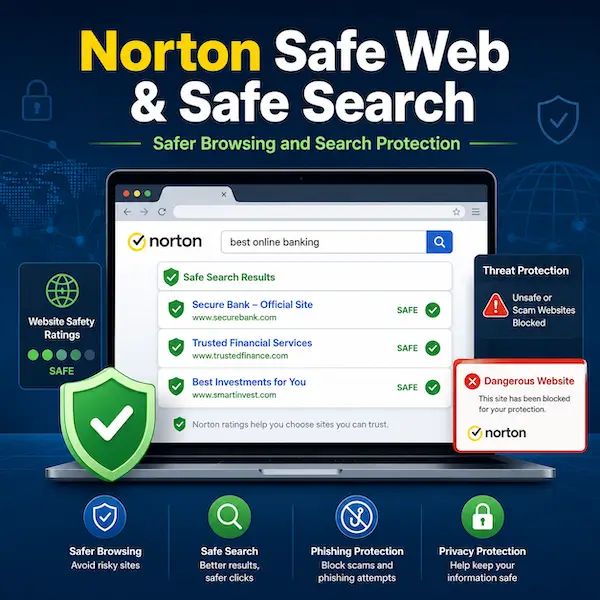
Norton Safe Web and Norton Safe Search are designed to help users browse and search the internet more safely. Norton Safe Web focuses on warning users about dangerous, suspicious, or scam-related websites before they interact with them, while Norton Safe Search is built to make the search experience safer by combining search results with Norton’s safety-focused browsing tools. Together, these features are meant to reduce the risk of clicking harmful links, visiting unsafe websites, or being misled by scam pages while browsing online.
This page explains how Norton Safe Web and Norton Safe Search work today, how they differ, and how they fit into Norton’s broader online safety features. It also helps clarify how site warnings, safety ratings, browser extensions, and search integration work together. Because Norton now presents Safe Web as part of its scam-protection and safer-browsing tools, it makes sense to look at both Norton Safe Web and Norton Safe Search in one place rather than treat them as completely separate topics.
Overview of Norton Safe Web and Norton Safe Search
Norton Safe Web is designed to help users identify risky websites before harm occurs. Norton says it uses AI-powered features and website analysis to detect scams, phishing attempts, malicious links, and other dangerous online content, then warns users before they continue to unsafe pages. Norton also presents Safe Web as part of Norton 360 and its broader scam-protection approach, including browser-based protection and real-time analysis of suspicious content patterns.
Norton Safe Search is related, but it serves a different role. Rather than focusing only on website warnings after a click, Safe Search is designed to support safer searching from the start by providing a search experience tied to Norton’s online-safety tools. Norton also provides installation support for Safe Search on browsers such as Chrome, Firefox, and Microsoft Edge, which shows that Safe Search and Safe Web both depend in part on browser-based functionality. In practical terms, Safe Web helps evaluate websites, while Safe Search helps users make safer decisions earlier in the browsing process.
What Norton Safe Web Is
Norton Safe Web is a browsing-safety feature designed to help users identify dangerous, suspicious, or scam-related websites before interacting with them. Norton says Safe Web is part of Norton 360 and uses advanced analysis to detect scams, phishing attempts, malicious links, and other online threats that may appear during everyday browsing, shopping, and searching.
What Norton Safe Web does
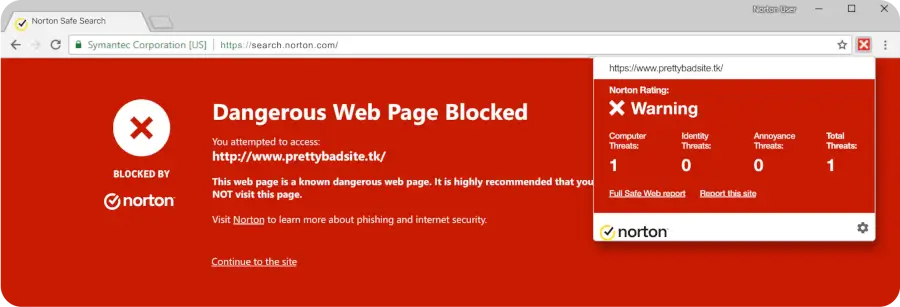
Norton Safe Web helps warn users about risky websites and suspicious online destinations. Norton explains that it analyzes content patterns to identify malicious links, phishing attempts, and other threats, then alerts users before they continue to those sites.
How Norton Safe Web fits into Norton 360
Norton currently presents Safe Web as part of Norton 360, especially within its broader scam-protection and safer-browsing tools. This means Safe Web is positioned not as a separate standalone antivirus product, but as one layer of Norton’s overall online protection approach.
Why Safe Web matters today
Norton’s current Safe Web messaging focuses heavily on modern scam risks, including fake shopping pages, fake banking sites, phishing attempts, and other websites designed to steal passwords, credit card details, or personal information. That makes Safe Web especially relevant for users who shop, bank, browse, and search online regularly.
How Norton Safe Web Works
Norton Safe Web is built to evaluate websites and help users make safer decisions before they interact with risky online content. Norton describes it as part of a real-time browsing-safety system rather than just a static website list.
Site analysis and threat detection
Norton says Safe Web analyzes websites and their content patterns to detect whether there are risks such as malicious links, phishing attempts, malware, spyware, ransomware, or other threats. This allows the tool to do more than simply show a generic warning after the fact.
AI-powered scam detection
Norton now emphasizes that Safe Web uses AI-powered features to detect scam-related content and dangerous websites. This reflects a more current approach than older Safe Web descriptions that focused more on website reputation alone.
Warnings before visiting unsafe sites
One of the main benefits of Safe Web is that it can warn users before they continue to a dangerous or suspicious page. Norton’s current feature page presents this as protection against scams and harmful sites before they can cause damage.
Norton Safe Web Safety Ratings
Norton Safe Web uses a rating system to help users understand how safe a website may be before interacting with it. These ratings can make browsing and search decisions easier, especially when a website is unfamiliar. Norton’s support guidance explains that safety ratings are meant to help users browse, search, and shop more safely online.
Safe
A Safe rating means Norton has analyzed the site and does not currently identify it as unsafe based on its security review. This is the most reassuring rating in the Safe Web system, though users should still browse with normal caution.
Untested
An Untested rating means Norton does not yet have enough analysis data about the site. This does not automatically mean the site is dangerous, but it does mean users should be more careful before trusting it fully.
Unsafe
An Unsafe rating means Norton has identified the site as dangerous or risky. In practical terms, this is the clearest sign that users should avoid interacting with the site, especially if it may involve malicious downloads, scams, or phishing behavior.
Caution
A Caution rating generally means the site may not be fully unsafe, but it still raises concerns that make extra care a good idea. In this kind of situation, users should avoid assuming the site is trustworthy just because it loads normally.
What Norton Safe Search Is
Norton Safe Search is Norton’s search tool focused on online safety. Norton describes it as a search engine and browser-based safety feature that helps users avoid phishing sites and other risky pages that may appear in search results. Instead of waiting until after a click, Safe Search is designed to bring safety information into the search experience itself.
How Norton Safe Search differs from Safe Web
The main difference is that Safe Web focuses on evaluating websites and warning users about danger, while Safe Search focuses on the search-results stage. In other words, Safe Search helps users make safer choices earlier, before they click through to a website.
How Safe Search helps users browse more safely
Norton says Safe Search helps protect users from visiting phishing sites and other risky pages that may appear in search results. It does this by using browser-based risk detection and by flagging potentially unsafe sites directly on the search results page.
How Safe Search and Safe Web work together
Norton explains that Safe Search uses Norton Safe Web technology to analyze and rate websites for risks such as phishing, malicious downloads, and unsafe links. That means the two tools are closely connected, even though they serve slightly different purposes.
How to Install Norton Safe Search
Norton provides browser-based setup instructions for Safe Search, and current support guidance shows that installation depends on which browser you use. Norton also states that your default search engine is changed to Norton Safe Search after the extension is installed.
Google Chrome
For Chrome, Norton says users should launch the Norton Safe Search URL, click Install for Free, and then complete the Chrome Web Store installation for the extension.
Mozilla Firefox
For Firefox, Norton instructs users to open the Mozilla Firefox add-ons page, search for Norton Safe Web, and then complete the Firefox extension installation.
Microsoft Edge
For Edge, Norton says users should open the Microsoft Edge add-ons page, click Get, and then confirm the extension installation in the prompt that appears.
Why browser support matters
Browser support matters because Norton Safe Search and Safe Web depend partly on browser extensions and search integration. Norton’s current Safe Search support article says Safe Search is supported only in Microsoft Edge, Mozilla Firefox, and Google Chrome.
Norton Safe Web vs Norton Safe Search
Because the names are similar, it is easy to confuse these tools. The clearest way to think about them is that Safe Web helps evaluate websites, while Safe Search helps guide users at the search stage before they even click. Norton’s own pages show that the two are closely connected, but not identical.
Safe Web for website warnings
Safe Web is more directly about website evaluation, threat analysis, and warning users about danger when they encounter risky online destinations.
Safe Search for safer searching
Safe Search is more directly about helping users search with greater peace of mind by adding safety-focused search behavior and site-risk information to the search process.
Why users may want both
Using both makes sense because one helps earlier and the other helps deeper into the browsing process. Together, they can reduce the risk of clicking harmful search results and continuing to dangerous sites.
How both tools fit Norton’s scam-protection approach
Norton’s current Safe Web page clearly positions Safe Web within scam protection, and Safe Search uses Safe Web technology to show site risks in search results. That means both tools are part of Norton’s broader safer-browsing and scam-awareness approach.
What Norton Safe Web and Safe Search Can Help Protect Against
Norton presents these tools as useful against several common online risks. While they are not a replacement for full security software, they are meant to help users avoid some of the most common dangerous clicks and scam-related interactions.
Phishing and fake login pages
Norton says Safe Web and Safe Search can help protect users from phishing sites and fake pages designed to steal passwords or other personal information.
Scam shopping sites
Norton’s Safe Web page specifically highlights fake shopping websites as a modern scam risk. These are the kinds of pages users may encounter while searching for deals or products online.
Malicious downloads and unsafe links
Norton also says Safe Web technology helps identify risks such as malicious downloads and unsafe links, which can be especially important when browsing unfamiliar sites or clicking through from search results.
Suspicious or untested websites
Not every risky site is obviously malicious at first glance. That is one reason Norton’s rating system includes categories such as Untested and Caution, which help users recognize when extra care is needed.
Important Limits and Things to Know
Safe-browsing and safe-search tools can reduce risk, but they are not perfect. Norton’s own support and product pages make it clear that setup, browser compatibility, and rating availability all matter to how these tools work in practice.
A rating is helpful, but not a guarantee
A Safe Web rating is useful guidance, but it should not be treated as a guarantee that every page on a site will always be harmless. Users still benefit from paying attention to suspicious behavior, unexpected requests, and unusual site content.
Untested sites require extra caution
If a site is marked Untested, that means Norton does not yet have enough information to rate it confidently. In that kind of situation, users should be especially cautious before entering personal or financial information.
Browser setup can affect functionality
Norton’s current support guidance shows that Safe Search depends on browser-based installation and is supported only on Chrome, Firefox, and Edge. Browser setup can therefore affect what protection and safety information users actually see.
Safe Web and Safe Search are part of a broader protection strategy
These tools work best as part of a broader online-safety approach that also includes general security software, good browsing habits, and caution around suspicious offers, links, and requests. Norton itself positions Safe Web as one piece of its broader Norton 360 protection experience.
Who Norton Safe Web and Safe Search May Be Best For
Norton Safe Web and Safe Search can be useful for many everyday internet users, but they may be especially helpful for people who want more guidance before clicking on unfamiliar links or visiting unknown sites. Their value is strongest when the user cares about scam avoidance, search-result safety, and earlier warnings about dangerous pages.
Everyday users who browse, shop, and search online
Anyone who regularly shops, searches, and browses online can benefit from additional safety signals before clicking on unfamiliar websites.
People concerned about scams and phishing
Users who worry about phishing, fake shopping sites, impersonation pages, and suspicious search results may find these tools especially useful because Norton emphasizes those risks in its current Safe Web messaging.
Families wanting added browsing safety
Families may also appreciate extra help identifying which links and sites look risky, especially when multiple people use the same browser or search across many unfamiliar pages.
Users who want more guidance before clicking links
These tools are a good fit for users who want a stronger “pause before click” layer rather than relying only on what happens after they reach a suspicious page.
Common Questions About Norton Safe Web and Safe Search
The questions below cover some of the main points users often want to clarify when comparing Norton Safe Web and Norton Safe Search.
What is Norton Safe Web?
Norton Safe Web is a Norton 360 feature designed to help detect scams and dangerous websites, then warn users before they continue to unsafe pages.
What is Norton Safe Search?
Norton Safe Search is Norton’s search engine and browser-based safer-search tool focused on helping users avoid phishing and other risky sites that may appear in search results.
Are Norton Safe Web and Safe Search the same thing?
No. They are closely related, but they are not the same. Safe Web focuses more on website analysis and warnings, while Safe Search focuses more on safer search results and earlier browsing decisions.
What do Norton Safe Web ratings mean?
Norton Safe Web ratings are meant to show whether a site appears safe, untested, unsafe, or worthy of caution. These ratings help users make more informed browsing decisions, especially on unfamiliar websites.
How do I install Norton Safe Search?
Norton provides browser-based installation steps for Chrome, Firefox, and Edge through its official support page. The exact steps depend on the browser being used.
Does Norton Safe Search work on Chrome, Firefox, and Edge?
Yes. Norton’s current support article says Safe Search is supported on Microsoft Edge, Mozilla Firefox, and Google Chrome.
Can Norton Safe Web help with scam websites?
Yes. Norton’s current Safe Web page specifically says it helps detect and block scam-related and dangerous websites, including fake shopping and phishing pages.
Learn More About Norton Browsing and Security Tools
If you want to explore related Norton topics in more detail, you can also visit our Internet Security Solutions by Norton page, read our Norton 360 Questions and Answers, review our Norton Products and Services Overview, or browse our main Norton products section for more security and browsing resources.
« Back to the Norton Resource Center