Petya Ransomware
Petya Ransomware: One of the First MBR-Encrypting Ransomware Threats
Petya ransomware, first identified in March 2016, introduced a new approach to ransomware attacks by encrypting the Master File Table (MFT) instead of individual files. This effectively locked the entire system, preventing access to all files and rendering the computer unusable without the decryption key.
Introduction to Petya Ransomware
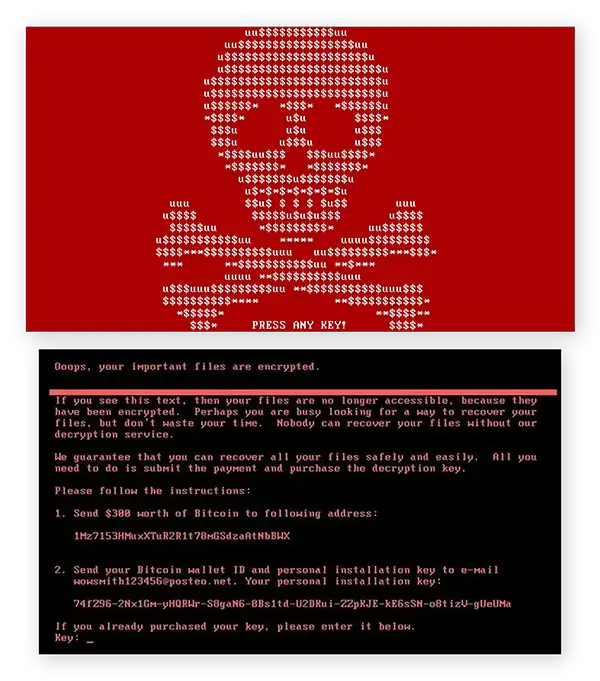
Unlike most ransomware strains that encrypt individual files, Petya took control of a victim’s entire system by encrypting critical file system components. It overwrote the Master Boot Record (MBR) with its own malicious code, preventing the system from booting properly and displaying a fake CHKDSK screen while it encrypted the MFT. Victims were then presented with a ransom note demanding payment in Bitcoin to restore access.
1. How Petya Ransomware Works
Infection Mechanism:
Petya typically spread through phishing emails with malicious attachments, often disguised as job applications or business documents. The malware executed when users opened the infected attachments and granted administrative privileges, allowing Petya to overwrite the MBR.
Encryption Process:
Once executed, Petya rewrote the system’s MBR, which controlled the computer’s startup process. It then forced a system reboot and displayed a fake CHKDSK utility message while it encrypted the Master File Table (MFT), which is essential for locating files on a disk. Without the MFT, the entire file system became inaccessible.
Ransom Note:
After encryption, Petya displayed a red skull-and-crossbones image with a ransom note demanding payment in Bitcoin. Victims were instructed to visit a Tor-based payment portal to obtain the decryption key upon payment.
2. History and Notable Campaigns
Origin and Discovery:
Petya was first discovered in March 2016 by security researchers. It represented an evolution in ransomware design by targeting the entire disk structure rather than encrypting individual files.
Notable Campaigns:
- Petya primarily targeted businesses, spreading through spear-phishing campaigns.
- Later versions and variants, such as Mischa and GoldenEye, expanded on Petya’s functionality by adding file encryption capabilities in case the malware failed to gain admin privileges.
3. Targets and Impact
Targeted Victims and Sectors:
Petya primarily targeted businesses and organizations that relied on email communications for recruitment, finance, and operations.
Victims included:
- Enterprises with unpatched systems
- Small and medium-sized businesses (SMBs)
- Industries susceptible to phishing attacks
Consequences:
Petya attacks caused complete system lockouts, operational disruptions, and data inaccessibility. Victims who did not have reliable backups faced potential data loss unless they paid the ransom.
4. Technical Details
Payload Capabilities:
- MBR Overwrite: Replaces the legitimate Master Boot Record with malicious code.
- MFT Encryption: Encrypts the Master File Table, preventing access to files on disk.
- Fake CHKDSK Screen: Displays a counterfeit system check while encrypting the MFT.
- Ransom Demand: Demands payment via Tor-based portals in Bitcoin, typically ranging from $300–$500 per infection.
Evasion Techniques:
Petya leveraged social engineering in phishing emails to gain administrator rights on infected machines. Without administrative privileges, the malware’s primary payload wouldn’t execute; later versions addressed this limitation.
5. Preventing Petya Infections
Best Practices:
- Train employees on phishing awareness and safe email practices.
- Disable macros and restrict the execution of potentially malicious attachments.
- Apply the principle of least privilege (PoLP) for user accounts to minimize administrative access.
- Regularly patch operating systems and third-party applications to close security gaps.
Recommended Security Tools:
- Email filtering systems with anti-malware capabilities.
- Endpoint detection and response (EDR) platforms to detect suspicious behavior.
- Regular backups of critical data stored offline or in immutable storage for reliable recovery.
6. Detecting and Removing Petya
Indicators of Compromise (IoCs):
- Sudden system reboots followed by an altered boot process displaying a red skull image.
- Ransom notes appearing post-reboot with instructions for payment.
- Encrypted MFT preventing access to files despite the file data remaining unaltered.
Removal Steps:
- Power off the affected machine immediately to prevent full MFT encryption (if caught early).
- Boot from a clean, unaffected system to assess and restore MBR integrity.
- Restore the system from clean, offline backups.
- In later versions, if the encryption process completed, there was no public decryptor for recovery without paying the ransom.
Professional Help:
Organizations are encouraged to work with cybersecurity professionals to restore systems and prevent reinfection.
7. Response to a Petya Attack
Immediate Steps:
- Disconnect the infected device from all networks to prevent further spread.
- Notify your IT or security team to initiate the incident response plan.
- Report the incident to law enforcement and regulatory bodies if necessary.
- Begin data recovery efforts using unaffected backups and clean system images.
8. Legal and Ethical Implications
Legal Considerations:
If sensitive or personal data is inaccessible or potentially breached, organizations may be subject to data protection regulations requiring disclosure and mitigation.
Ethical Considerations:
Paying ransoms perpetuates the ransomware ecosystem. Best practices prioritize prevention, incident response planning, and investment in resilient backup strategies.
9. Resources and References
- No More Ransom Project: General ransomware prevention and support (no public decryptor for Petya).
- CISA Guidelines for ransomware response and best practices.
10. FAQs about Petya Ransomware
Q: What is Petya ransomware?
Petya is ransomware that encrypts a system’s Master File Table (MFT) and overwrites the Master Boot Record (MBR), locking victims out of their entire system.
Q: How did Petya spread?
Petya typically spread via phishing emails with infected attachments that tricked users into granting administrative privileges.
Q: Is there a public decryptor for Petya ransomware?
No universal decryptor exists for the original Petya ransomware. Recovery requires restoring from clean, secure backups.
11. Conclusion
Petya ransomware introduced a new level of disruption by encrypting entire file systems instead of individual files. Its innovation in ransomware tactics influenced the development of more advanced and destructive variants, such as NotPetya, highlighting the evolving sophistication of ransomware threats and the need for comprehensive cybersecurity strategies.
« Back to the Virus Information Library