Norton Remove and Reinstall Tool
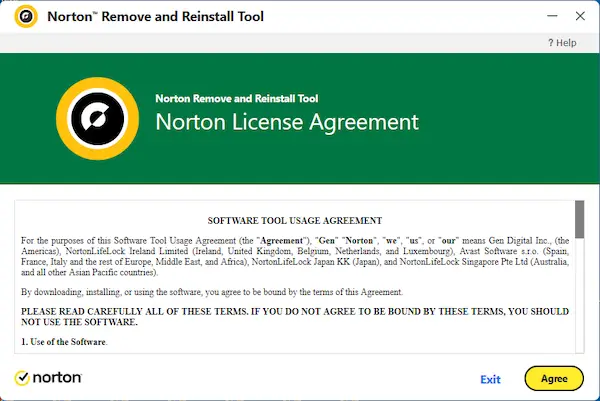
The Norton Remove and Reinstall tool is designed to help users remove Norton device security software from a Windows computer and, when needed, reinstall it as part of a cleaner setup process. This can be useful when Norton is not working correctly, when an installation has become damaged or incomplete, or when users need to troubleshoot software problems before starting fresh. Norton also now provides a more specific Norton 360 Remover tool for Windows, which makes it helpful to understand how these removal options fit together and when each one may be relevant.
This page explains Norton’s current removal and reinstallation tools in a more practical way. It looks at what the tools are meant to do, when they may be useful, and what users should know before running them. Because Norton’s official removal tools are mainly focused on Windows, the page also clarifies that Mac users should follow a different Norton removal path rather than assume the same tool works in exactly the same way on every platform.
Overview of Norton Removal and Reinstallation Tools
Norton currently provides more than one official option for removing its software from a Windows device. The broader Norton Remove and Reinstall tool is intended to help users uninstall and reinstall, or remove, Norton device security products when ordinary uninstall steps are not enough. Norton also provides a dedicated Norton 360 Remover tool for Windows, which gives Norton 360 users a more product-specific removal option. Taken together, these tools are meant to make it easier to fix installation problems, clean up damaged software, and prepare for a fresh installation when needed.
It is also important to understand what these tools do not cover. Norton’s support guidance makes it clear that the Windows removal tools are not the right approach for every Norton-related product or every operating system. For example, Norton Private Browser is not removed with the Remove and Reinstall tool, and Mac users are directed to a separate Norton removal process for Mac. That is why the safest approach is to treat Norton’s official removal tools as part of a broader troubleshooting and reinstall process, rather than as a one-size-fits-all uninstall solution.
What the Norton Remove and Reinstall Tool Is
The Norton Remove and Reinstall tool is an official Windows utility that helps users uninstall and reinstall, or fully remove, a Norton device security product when normal uninstall steps are not enough. It is mainly intended for situations where Norton software is damaged, not working properly, or needs to be removed before a cleaner installation can take place.
What the tool is designed to do
Norton describes this tool as a way to uninstall and reinstall, or remove, Norton device security products on Windows. In other words, it is not just a basic uninstaller. It is also part of Norton’s recommended troubleshooting path when a clean reinstallation may help solve the problem.
When it may be useful
This tool may be useful when Norton will not install properly, when the program becomes damaged, when the software will not open or update correctly, or when a regular uninstall does not fully solve the issue. It can also help users who want to start fresh with a cleaner reinstall of the same Norton product.
What it is not meant to remove
Norton’s support guidance also makes it clear that the Remove and Reinstall tool is not used to uninstall Norton Private Browser. That means some Norton-related products still require separate removal instructions rather than the main Windows removal tool.
What the Norton 360 Remover Tool Is
Norton also provides a separate Norton 360 Remover tool for Windows. This gives Norton 360 users a more product-specific removal option and reflects the fact that Norton now distinguishes between the broader Remove and Reinstall tool and a dedicated remover tool for Norton 360 on Windows.
How it differs from the Remove and Reinstall tool
The main difference is that the Norton Remove and Reinstall tool is described more broadly as a Windows tool for uninstalling and reinstalling, or removing, Norton device security products, while the Norton 360 Remover tool is presented more specifically around removing Norton 360 on Windows. This makes the second tool more targeted in how Norton labels it.
When users may use the Norton 360 Remover tool
Users may choose the Norton 360 Remover tool when they specifically need to remove Norton 360 from a Windows PC and want to use the product-specific Norton support path for that task. This can be useful when the issue is clearly tied to Norton 360 rather than a broader Norton device security setup.
Looking for the latest Norton 360 offers? Explore current deals on Norton 360 plans, including features like antivirus, VPN, cloud backup, and identity protection.
When You May Need a Norton Removal Tool
Users do not usually need a removal tool during normal product use. These tools are mainly meant for situations where something has gone wrong or where a clean reset of the software is the best next step. Understanding the common use cases can help users decide whether a Norton removal tool is the right approach before they begin.
Failed or incomplete installation
If Norton did not install correctly, the software may be left in a partial or broken state. In that situation, a removal tool can help clear the product more completely before trying the installation again.
Damaged Norton software
Sometimes Norton may be installed, but parts of the product stop working as expected. If the software becomes damaged, corrupted, or unstable, a removal-and-reinstall process can be a more effective fix than ordinary troubleshooting alone.
Troubleshooting before reinstalling
In some cases, Norton’s tools are useful because they allow users to remove problem software and then reinstall it in a cleaner way. This can help resolve issues tied to updates, settings conflicts, or damaged installation files.
Preparing a clean reinstallation
Users may also want to remove Norton before reinstalling it on the same device after a reset, troubleshooting attempt, or major software issue. A clean reinstallation is often easier when the previous installation has been removed properly first.
How to Use the Norton Remove and Reinstall Tool on Windows
The Norton Remove and Reinstall tool is intended for Windows use, and the safest way to use it is through Norton’s official support page. Starting from the official source helps reduce the risk of downloading the wrong file or using outdated instructions.
Download the tool from the official Norton support page
The first step is to download the Norton Remove and Reinstall tool. To make that easier, we provide a direct download link here, which points to the official Norton download source: 👉 Norton Remove and Reinstall Tool
This helps make sure you are using the current Norton version of the utility rather than an old third-party copy.
Run the tool and follow the prompts
After downloading the tool, users can run it and follow the on-screen prompts. Norton’s guided process is designed to walk the user through removal and, where appropriate, reinstallation steps, rather than expecting everything to be done manually.
Restart the computer if required
As part of the process, the computer may need to restart. Users should be prepared for this possibility and save any open work before running the tool so the process is not interrupted.
Reinstall Norton after removal where appropriate
If the goal is to continue using Norton protection on the device, the next step after removal is usually to reinstall the product through the user’s Norton account or the normal Norton installation path. This is why the removal tool often works best as part of a full cleanup-and-reinstall process rather than as a final step by itself.
The video below shows how the Norton Remove and Reinstall tool works and what users can expect during the process. It can be a helpful visual guide for anyone who wants to see the removal steps before uninstalling and reinstalling Norton on a Windows computer.
How to Use the Norton 360 Remover Tool
The Norton 360 Remover tool follows the same general idea of using an official Norton utility to remove product software from Windows. Since it is tied more specifically to Norton 360, it should be treated as the Norton-supported removal path for users dealing directly with Norton 360 removal issues on a Windows PC.
When to choose the Norton 360 Remover tool instead
If the issue is specifically about removing Norton 360 and Norton’s dedicated Norton 360 Remover support page matches the product installed on the computer, that more specific tool may be the better path to follow. It gives users a Norton 360-focused removal option rather than the broader Windows remove-and-reinstall route.
Using the official Norton 360 Remover download page
As with the broader tool, the safest source is Norton’s official support page for the Norton 360 Remover tool. Using the official Norton page helps keep the process current and reduces the risk of using an outdated or unofficial download.
What to do after Norton 360 is removed
After Norton 360 has been removed, users who still want protection on the same device can sign in to their Norton account and reinstall the product if their subscription is still active. This keeps device protection tied to the same account and subscription rather than forcing a completely separate setup.
Important Things to Know Before Removing Norton
Before using any Norton removal tool, it helps to understand a few product-specific details. Not every Norton-related product is removed in the same way, and some software should be handled first before the main removal tool is run. Norton’s official guidance includes a few important exceptions that users should not ignore.
Back up important data first
Although Norton’s current removal articles are focused on uninstall and reinstall steps, it is still wise to back up important files and make sure you are ready to reinstall or reconfigure the software afterward. This is especially useful when removal is part of broader troubleshooting on the same device.
Norton Family should be uninstalled first
Norton’s support page states that if Norton Family is installed, it should be uninstalled before running the Norton Remove and Reinstall tool. This is one of the most important preparation steps for users who have Norton Family on the same Windows computer.
Mac users need a different removal method
Norton also makes it clear that Mac users should not rely on the Windows removal tool as if it were the same process on macOS. Instead, they are directed to a separate Norton removal path for Mac.
Removing Norton on a Mac
Mac users still have official Norton removal guidance, but it is handled separately from the Windows removal tools. That distinction matters because a Windows-focused removal utility is not the correct solution for users working on macOS.
Why Windows removal tools do not apply the same way on Mac
The Norton Remove and Reinstall tool and the Norton 360 Remover tool discussed on this page are Windows-focused tools. Mac installations use a different Norton removal process, so users should not assume the same utility or steps apply across both platforms.
Using Norton’s Mac removal guidance instead
If you need to remove Norton from a Mac, the best approach is to follow Norton’s official Mac-specific removal guidance rather than trying to adapt the Windows instructions. That keeps the process safer and more accurate for the platform you are using.
What to Do After Removing Norton
Removing Norton is often not the final goal. In many cases, users remove the product because they want to reinstall it cleanly, restore normal protection, or move forward with a better-working setup. Thinking about the next step ahead of time can make the removal process easier to manage.
Reinstall Norton if you still want protection
If you still plan to use Norton on the device, the next step is usually to reinstall the product after removal is complete. This is especially common when the tool was used as part of troubleshooting or to fix a damaged installation.
Sign in to your Norton account to download again
After removal, users can usually sign in to their Norton account to download the product again, provided the subscription is active and the device is still covered under the plan. This keeps the new installation connected to the existing account and subscription.
Check device and license management after reinstalling
Once the product has been reinstalled, it is a good idea to check the Norton account and confirm that the device is properly protected and listed under the subscription. This helps make sure the reinstall process finished correctly.
Common Problems the Removal Tool Can Help Solve
Norton’s removal tools are mainly useful when ordinary uninstalling or troubleshooting is not enough. They are most valuable in situations where the software has become difficult to repair through normal settings or reinstall attempts.
Norton will not launch
If Norton will not open or repeatedly fails to start, a clean removal and reinstall process may help restore the product to a working state.
Installation errors
Users who keep seeing installation failures, incomplete setup, or repeated install problems may benefit from fully removing the product first and then reinstalling it more cleanly.
Reinstall problems
Sometimes even a reinstallation attempt fails because older Norton files are still interfering with the process. A removal tool can help clear that leftover software state more effectively than a basic uninstall alone.
Persistent software conflicts
If Norton continues to conflict with other software or appears unstable after updates or repairs, removing and reinstalling it can sometimes be the most practical troubleshooting step before trying other fixes.
Common Questions About Norton Removal Tools
The questions below cover some of the most common things users want to know before using a Norton removal utility. They are meant to clarify the differences between the available tools and the situations where each one may help.
What does the Norton Remove and Reinstall tool do?
It is an official Windows tool that helps uninstall and reinstall, or remove, Norton device security products when normal uninstall steps are not enough.
Is the Norton Remove and Reinstall tool only for Windows?
Yes, the Norton support guidance for this tool is focused on Windows. Mac users are directed to a separate Mac removal process.
Can it remove Norton Private Browser?
No. Norton’s support page specifically says the Remove and Reinstall tool cannot be used to uninstall Norton Private Browser.
Do I need to uninstall Norton Family first?
Yes. Norton states that if Norton Family is installed, it should be uninstalled before running the Remove and Reinstall tool.
What should Mac users do instead?
Mac users should follow Norton’s separate Mac removal guidance rather than using the Windows removal tools covered on this page.
What is the difference between the Norton Remove and Reinstall tool and the Norton 360 Remover tool?
The Remove and Reinstall tool is presented as a broader Windows utility for Norton device security products, while the Norton 360 Remover tool is a more product-specific Windows removal option for Norton 360.
Learn More About Norton Installation and Account Management
If you want to explore related Norton topics in more detail, you can also visit our Norton 360 Installation Guide, read our Norton Account Guide, review our Norton Multi-Device Security Software page, or browse our main Norton software page for more product and setup resources.
« Back to the Norton Resource Center