Norton Protection Model
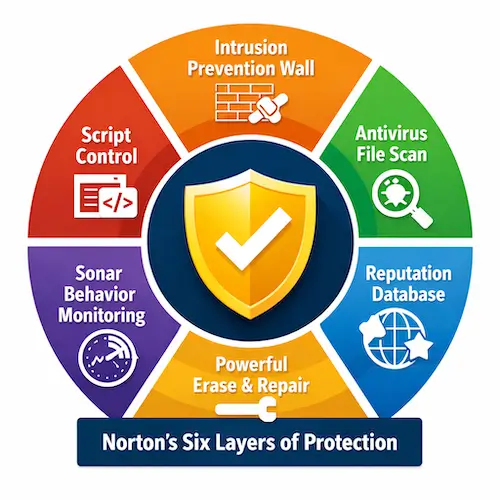
Norton’s protection model is built around multiple layers of security that work together to help stop threats at different stages of an attack. Rather than relying on a single scan or one type of detection, Norton uses a broader approach that can help identify suspicious network activity, inspect files, evaluate reputation, monitor behavior, control malicious scripts, and assist with cleanup when a system has already been affected.
This page provides an updated overview of Norton’s six-layer protection model. It explains how each layer plays a different role in helping protect devices from complex online threats, and why a layered approach remains important for dealing with modern malware, phishing-related attacks, and other forms of malicious activity.
How Norton’s Protection Model Works
Norton’s protection model is designed to use several security technologies together rather than depend on a single method of detection. Each layer focuses on a different part of the threat process, which helps Norton respond to risks at the network level, the file level, the behavior level, and during the cleanup and repair stage. This makes the overall model more flexible when dealing with both known and emerging threats.
The first layer, Intrusion Prevention Wall, is intended to help inspect incoming traffic and block certain attack attempts before they reach a device. The remaining layers are designed to help detect suspicious files, review reputation signals, monitor harmful behavior, control malicious scripts, and remove deeply embedded threats when needed. Taken together, these six layers form a broader protection model that helps explain how Norton works beyond a traditional antivirus scan.
| NETWORK | FILE | REPUTATION | BEHAVIORAL | SCRIPT | REPAIR |
| Network-based Protection | File-based Protection | Reputation-based Protection | Behavioral-based Protection | Script Control | Remediation Tools |
| Helps inspect incoming network activity and block threats before they reach the device | Scans files and helps detect malware using signatures, emulation, and machine learning | Uses reputation intelligence to classify files and applications | Watches for suspicious application behavior in real time | Helps detect malicious scripts, fileless threats, and exploit-style activity | Helps remove stubborn threats and repair affected systems |
|
|
|
|
|
|
The table above shows the layers of protection that Norton 360 uses to protect your devices and valuable data on them.
Top Threat Vectors
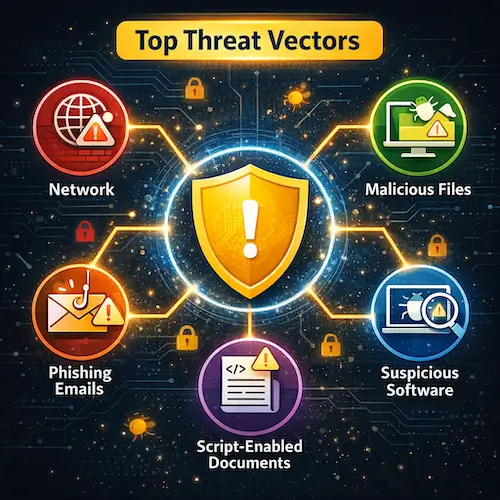
Norton’s six-layer protection model is designed to address a wide range of online threats that can reach users in different ways. Some threats try to enter through the network, while others arrive through downloaded files, phishing emails, malicious documents, unsafe websites, or suspicious software behavior. This is one reason Norton uses a layered protection approach rather than relying on a single form of detection.
The threat vectors below help explain the kinds of risks Norton technologies are built to detect, block, and help remove. While the exact methods used by attackers continue to evolve, these categories remain among the most common ways malware and other harmful activity reach devices.
Network-based attacks
Some threats attempt to reach a device through the internet connection by exploiting weaknesses in browsers, operating systems, or exposed services. These attacks are closely tied to Norton’s Intrusion Prevention Wall and other network-focused defenses.
Malicious files and downloads
Many threats still arrive through files such as downloads, installers, attachments, and disguised applications. These risks are most directly addressed through Antivirus File Scan and Reputation Database technologies.
Phishing emails and script-enabled documents
Phishing attacks often rely on attachments, links, and documents containing scripts, macros, or embedded content. This is where Script Control plays an important role within Norton’s protection model.
Suspicious software behavior
Some threats try to avoid direct detection by hiding their code or changing their appearance. In these cases, Norton can also look at what a program does on the device, which connects to Sonar™ Behavior Monitoring.
Deep-rooted and hard-to-remove infections
Not every threat is stopped before it reaches a system. Some infections become deeply embedded or leave harmful changes behind, which is why Norton also includes Powerful Erase and Repair as part of its overall protection model.
Intrusion Prevention Wall
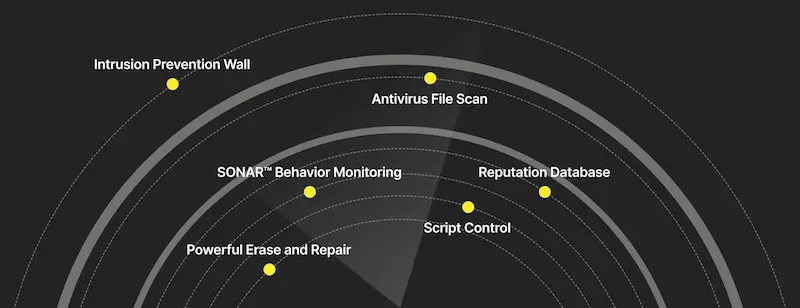
Intrusion Prevention Wall is the first layer in Norton’s protection model and focuses on threats that may try to enter through the network connection. Its role is to inspect incoming traffic and help block suspicious or malicious activity before it reaches the device itself. This makes it an important part of Norton’s broader effort to stop attacks as early as possible.
At this stage, Norton’s protection model is not yet focused on files stored on the device. Instead, it is concerned with what is coming in through browsers, operating systems, and internet-facing connections. This is why the network layer serves as a kind of first line of defense against many online attacks.
What is Norton’s Intrusion Prevention Wall?
Norton’s Intrusion Prevention Wall refers to the network-focused layer that helps inspect incoming traffic for attack attempts. It is designed to look for signs that a browser, operating system, or connected service may be targeted through a known or suspicious weakness. By analyzing traffic before it is allowed through, this layer helps stop certain threats before they can move deeper into the system.
How network-level protection works
Network-level protection works by examining data that is being sent to a device and checking whether it matches patterns associated with intrusions, exploits, or other unsafe activity. This is different from scanning a file that already exists on the computer. Instead, the goal is to recognize dangerous traffic early and prevent the attack from gaining access in the first place.
Smart Firewall and Intrusion Prevention System
Norton describes the Smart Firewall and the Intrusion Prevention System as technologies that work together at this first level of protection. In simple terms, the firewall helps control and monitor network connections, while intrusion prevention is designed to inspect traffic more closely for attack attempts. Together, they form a stronger network protection layer than a basic firewall alone.
What kinds of network threats this layer helps block
This layer is intended to help block threats such as intrusion attempts, malicious traffic, and attacks that try to exploit weaknesses in browsers or operating systems. Because many online threats first arrive through an internet connection, stopping them at the network level can reduce the chance that malware or other harmful activity ever reaches the device.
Antivirus File Scan
Antivirus File Scan is the file-based layer in Norton’s protection model. It focuses on files that are downloaded, opened, stored, or otherwise present on a device, helping Norton identify malware by examining the contents of those files for known and suspicious code.
Even though cyber threats have become more complex over time, file scanning still plays an important role in modern security. Many attacks still involve files in some form, whether as downloads, email attachments, installers, or documents. That is why this layer remains a core part of Norton’s overall protection approach.
What is Antivirus File Scan?
Antivirus File Scan is the layer that checks files on a device for signs of malware. It is designed to recognize dangerous code patterns, suspicious file content, and other indicators that may suggest a file is unsafe. If a file appears malicious, Norton can block, quarantine, or remove it as part of its security response.
How Norton scans files for malware
Norton scans files by analyzing their contents and comparing them against known malware intelligence, suspicious indicators, and advanced detection methods. This allows the software to help identify both familiar threats and files that may show characteristics commonly associated with malicious activity.
Machine learning and emulation in file detection
Modern file scanning goes beyond simple signature matching. Norton also uses methods such as machine learning and emulation to improve detection. These techniques can help evaluate files in a more flexible way, which is useful when malware authors reuse code, modify older threats, or try to disguise harmful files so they appear legitimate.
Why file scanning still matters
File scanning still matters because many infections begin with a file that a user downloads, opens, or receives through email or the web. Even when malware uses newer techniques, dangerous files remain one of the most common ways threats reach a device. This layer helps Norton identify those threats before they can do harm.
Reputation Database
Reputation Database adds another layer of analysis by looking beyond the file itself and considering how trustworthy that file appears to be. Instead of focusing only on code patterns or signatures, this part of the model uses reputation signals to help Norton decide whether a file is likely to be safe, unknown, or potentially risky.
This layer is useful because not every suspicious file can be judged by direct file scanning alone. Reputation-based analysis helps add context, which can improve how quickly Norton responds to software that is new, uncommon, or not yet widely trusted.
What is Norton’s Reputation Database?
Norton’s Reputation Database is the reputation-based layer that evaluates files using trust-related signals. These may include whether a file comes from a known source, whether it has a recognized signature, how widely it has been seen, and other indicators that help determine whether it should be treated as trustworthy or suspicious.
How reputation-based protection works
When a file is downloaded or encountered on a device, Norton can review its reputation before allowing it to pass without concern. Files from well-known and established publishers may move through more easily, while new, rare, or unfamiliar files can raise suspicion and receive closer attention.
Why file reputation matters
File reputation matters because malware often appears in forms that try to look harmless at first glance. A file may not yet be widely recognized as malicious, but its lack of history, low trust signals, or unusual origin can still make it worth examining more carefully. Reputation-based protection helps Norton respond to that kind of uncertainty.
How reputation helps classify unknown software
Not all software is immediately known to be safe or unsafe. Reputation analysis helps Norton classify software that may be unfamiliar by using broader trust information rather than relying only on direct malware signatures. This gives the protection model another way to deal with software that is new, uncommon, or not clearly established.
Sonar™ Behavior Monitoring
Sonar™ Behavior Monitoring is Norton’s behavior-based layer. Instead of judging software only by what it looks like, this part of the model focuses on what a program actually does while it runs. That makes it useful for spotting suspicious actions that may not be obvious from a file scan alone.
Behavior monitoring is especially important when malware is new or disguised. A program may not immediately appear dangerous when examined as a file, but its actions can reveal harmful intent. By watching for unusual behavior, Norton adds another layer that can help detect threats in real time.
What is Sonar™ Behavior Monitoring?
Sonar™ Behavior Monitoring is the layer that helps detect suspicious activity by observing how applications behave on a device. If a program begins acting in ways that resemble malware, Norton can treat it as a threat even if the file itself was not previously identified through traditional signature-based methods.
How Norton detects suspicious behavior
Norton looks for behaviors that legitimate software is less likely to perform, such as unusual attempts to access sensitive data, create suspicious communications, or carry out actions commonly associated with malware. When behavior appears unsafe, Norton can help block or stop that activity before it causes more damage.
Behavior monitoring vs. file signatures
File signatures focus on what malware is, while behavior monitoring focuses on what malware does. This difference is important because attackers often change code or create new variants to avoid direct signature detection. Behavior-based analysis gives Norton another way to detect threats that try to avoid more traditional methods.
Why behavior-based detection matters for newer threats
Behavior-based detection matters because many modern threats are designed to change quickly, hide their code, or avoid being recognized as known malware. Watching behavior can help Norton respond to suspicious activity even when a threat is new, uncommon, or not yet widely cataloged.
Script Control
Script Control is the layer in Norton’s protection model that focuses on scripts and script-enabled content that may be used in malicious documents, phishing emails, and downloaded attachments. Scripts can be used for legitimate functionality, but they can also be abused to deliver malware or trigger unsafe actions when a file is opened or interacted with.
This layer matters because not every attack begins with a traditional executable file. Some threats rely on documents, macros, ActiveX controls, embedded objects, add-ins, or other dynamic content to carry out harmful actions. Script Control helps Norton address this kind of document-based and script-assisted threat activity.
What is Script Control?
Script Control is the layer that helps protect against malware delivered through scripts and script-enabled content. It is designed to inspect and control certain types of active content that may be present in files, especially when those files arrive through phishing messages or suspicious downloads.
How malicious scripts can be used in documents and email attachments
Malicious scripts can be hidden inside files that appear ordinary, such as office documents or email attachments. When opened, that content may attempt to run harmful actions, download malware, or exploit trust in a familiar-looking file. This is one reason script-based threats remain a concern in phishing-related attacks.
What types of script-based content Norton looks at
Norton describes Script Control as helping protect against risky content such as ActiveX controls, macros, data connections, add-ins, linked and embedded objects, and similar document-based script elements. These features may be useful in normal files, but they can also be abused to carry out malicious actions.
Why Script Control matters in Norton’s protection model
Script Control matters because it addresses a type of threat activity that may not fit neatly into simple file scanning alone. Modern attacks often rely on documents and email attachments to trick users into opening content that appears harmless. By watching for suspicious scripts and related content, Norton adds another layer that helps deal with these more indirect attack methods.
Powerful Erase and Repair
Powerful Erase and Repair is the remediation layer in Norton’s protection model. Its role is to help deal with threats that have already made it onto a device, especially when they are difficult to remove or have become deeply embedded in the system. This layer is about cleanup, recovery, and restoring a safer system state after an infection or serious security event.
Although Norton historically referred to tools such as Norton Power Eraser and Norton Bootable Recovery Tool when describing this layer, Norton has announced that Norton Power Eraser is being discontinued and that its functionality is being integrated into Norton security applications. For that reason, this part of the model is best understood as Norton’s broader built-in erase and repair capability, not as a separate standalone tool.
What does Powerful Erase and Repair mean?
Powerful Erase and Repair refers to Norton’s advanced remediation capability for handling threats that may be stubborn, deeply rooted, or difficult to remove through ordinary scanning alone. It represents the cleanup side of the protection model, where the goal is not just to detect malware, but also to help remove it and restore the system afterward.
How Norton handles difficult infections
When malware has already reached a device and become harder to remove, Norton’s repair-focused technologies are intended to help identify the threat, isolate it, remove it, and support recovery. This is particularly important for infections that interfere with normal operation, resist standard removal, or leave behind harmful changes on the system.
Repair tools for deeply embedded malware
Some threats are designed to bury themselves deeply in a system, making them harder to detect and clean up with basic methods. Norton’s erase-and-repair layer is meant to address these more difficult cases by using stronger remediation techniques within Norton’s security environment. This gives the overall model an important recovery function in addition to prevention and detection.
Why cleanup remains part of the protection model
No security model can assume that every threat will always be stopped before any damage occurs. That is why cleanup and repair still matter. A layered protection system is stronger when it includes the ability to respond after a threat is detected, helping users recover from infections and restore safer device operation.
Why Norton Uses Multiple Layers of Protection
Norton uses multiple layers of protection because no single technology can stop every kind of threat. Some attacks try to enter through the network, some arrive in files or documents, some depend on suspicious behavior at runtime, and others are only recognized once cleanup becomes necessary. A layered protection model gives Norton more than one opportunity to detect, block, contain, and remove threats.
This is also what makes Norton’s protection model broader than a traditional antivirus scan alone. By combining prevention, detection, script control, behavior monitoring, reputation analysis, and repair capabilities, Norton is able to apply security at different stages of an attack. The result is a more complete approach to dealing with complex online threats that can change quickly and use multiple methods to reach a device.
Norton security products provide strong and reliable protection for computers and mobile devices. Depending on the plan, users can choose coverage for a single device or for multiple devices, with protection managed through their Norton account.
All Norton 360 plans include cloud backup for Windows PCs, a Secure VPN, a Password Manager, and the 100% Virus Protection Promise, although available storage space and certain features may vary by edition.
Compare Norton 360 Products and Prices
« Back to the Norton Resource Center