Take Action and Fight Spam by Reporting Email Spam to SpamCop.net
Tired of Email Spam? Report Email Spam Now!
Everybody is tired of email spam filling up our inboxes, even if our email is properly filtered by various junk mail filters like those that are built into our email client software (Microsoft Outlook) or those that come as a part of antivirus or internet security software package, or by filters that are provided by our Internet service providers (ISP). Even with Norton AntiVirus software and antivirus protection protecting your system, your email inbox is susceptible to unwanted spam emails. Filters provided by your email service and ISP can help and even some antivirus protection and antivirus software can prevent spam, but it seems inevitable that you will get spam.
What makes it even more annoying is when spam shows our own email address is in the sender field. Does this mean that tens of thousands of people see our name sending those inexpensive drugs or college degrees for sale emails? Or maybe “we” are actively promoting bed time fun enhancements or the latest Rolex replicas?
Yuck!
Reporting Spam Emails Through Spam Cop
Receiving spam emails makes us search Google for such things as “report spam”. The top result at the time of when this article has been written was Spam Cop (SpamCop.net). Spam Cop is not an antivirus program or antivirus software, but rather Spam Cop fights spam with your help.
In short, Spam Cop fights email spam by offering a free reporting tool as well as the paid email service. It also offers a service where users can check if their own IP address is being blocked by ISP providers. This happens if a certain IP address gets abused by relaying spam emails while the owner is not even aware of it. That is usually achieved by dishonest spammers via free downloads including computer viruses and Trojans. Make sure to get and use a reliable antivirus program and antivirus software as this will protect your system from being used in such a manner.
Our focus here is more on how an individual can report spam for free, all in hope that spammers will get stopped by making a pressure onto their ISPs and hosting companies.
Here are the steps one should perform if he/she decides to use Spam Cop:
- Go to https://www.spamcop.net/
- Under "Report Spam", get familiar with the process and how it works.
- Pay special attention to Email Headers section. The point about headers is that they reveal the real sender of the message, regardless what has been showing in regularly viewable sender field.
- Follow the directions under "Register for the Free Reporting Service" section.
- Once you have your free reporting account activated after receiving initial email from Spam Cop, get familiar with the process of reporting spam.
- Be sure you visit SpamCop FAQ page which offers links to other reputable sites that are active in fighting against email spam.
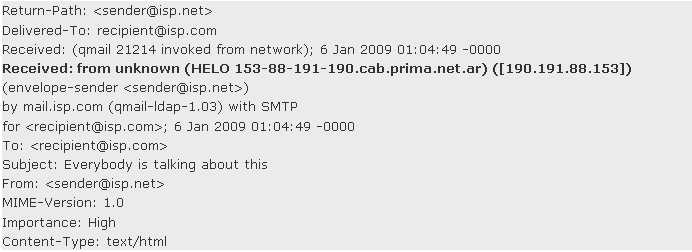
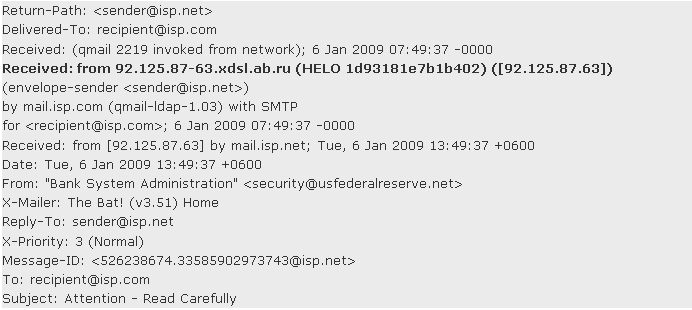
Below are two examples of some of the simpler headers of the spam email. Pay attention to the fourth line in bold which in both cases represents the real sender - aka spammer. sender@)isp.net is the "stolen" email address used to mask the real sender. recipient@isp.com is your own email address. IN second example, the From field reads differently from the stolen sender address in order to make it more official. If the spammer used your email address as a sender, than you may find in email header that sender = recipient.
Spam Email Header - Example 1:
Spam Email Header - Example 2:
Antivirus Protection and Spam Reporting
With a combination of antivirus software, like Norton security software, and tools such as Spam Cop's reporting tool, you can protect your system and actively participate in the fight against spam.