GetMyDrivers
Keep Your PC Running Smoothly with GetMyDrivers
GetMyDrivers
1 Year
- Free download & scan
- Renews yearly at the annual price of $29.99
Features: Support for most devices, Automatic & reliable updates, Easy driver backup & restore, Protects against vulnerabilities
30-day money-back guarantee
More information at GetMyDrivers.com
GetMyDrivers – Keep Your PC Running Smoothly with Automatic Driver Updates
GetMyDrivers – Automatic Updates, Peak Performance, Stability, and Security

Outdated or missing drivers are one of the leading causes of system crashes, slow performance, and hardware malfunctions. Keeping drivers updated ensures that your PC runs smoothly, hardware functions properly, and new software remains compatible. However, manually searching for and installing the right drivers can be time-consuming, confusing, and even risky.
GetMyDrivers takes the hassle out of driver updates by automatically scanning, detecting, and installing the latest drivers from verified manufacturers. With one-click updates, backup & restore options, and a massive driver database, GetMyDrivers ensures that your PC stays optimized, secure, and fully compatible with the latest software and hardware.
Whether you're a casual user, gamer, or professional, keeping drivers up to date is essential for performance, stability, and security. Let GetMyDrivers do the work for you—effortlessly and safely.
Why Use GetMyDrivers?
Drivers are essential for a smooth and stable PC experience, ensuring that hardware and software work seamlessly together. However, keeping them up to date manually can be time-consuming, confusing, and risky. GetMyDrivers simplifies the process by automatically detecting, downloading, and installing the latest drivers, ensuring peak performance, stability, and security for any Windows PC.
✅ Fix Common PC Issues
Outdated, missing, or corrupt drivers can cause system crashes, freezing, and slow performance. GetMyDrivers identifies and fixes driver-related issues, restoring system stability.
✅ Improve Performance & Stability
Updated drivers help optimize hardware performance, ensuring that graphics, sound, networking, and other essential components run at their best. This means faster load times, fewer errors, and a smoother computing experience.
✅ Enhance Compatibility with New Software & Hardware
New software, games, and hardware often require the latest drivers to function properly. GetMyDrivers ensures your PC remains fully compatible with new applications, updates, and peripherals.
✅ Save Time with Automatic Updates
Instead of manually searching for drivers online, GetMyDrivers automatically scans and updates them with a single click, eliminating the risk of downloading incorrect or malicious drivers.
✅ Secure & Verified Driver Downloads
Manually installing drivers from unverified sources can expose your system to malware and compatibility issues. GetMyDrivers sources updates directly from trusted manufacturers, ensuring only safe and authentic drivers are installed.
For a faster, more stable, and hassle-free PC experience, GetMyDrivers is the ultimate solution for keeping drivers up to date effortlessly.
Key Features of GetMyDrivers
GetMyDrivers is designed to automate, simplify, and secure the driver update process, ensuring that PCs run smoothly, efficiently, and without errors. With one-click updates, real-time scanning, and a massive driver database, this tool eliminates the hassle of manual driver updates while maximizing performance and stability.
🔍 Automatic Driver Detection
- Scans the entire system to detect outdated, missing, or corrupted drivers.
- Provides a detailed report on driver health and identifies potential issues.
⚡ One-Click Updates
- Installs the latest drivers instantly, eliminating the need for manual searches.
- Ensures seamless compatibility with graphics cards, sound cards, network adapters, and peripherals.

💾 Backup & Restore
- Creates safe backups of existing drivers before updates.
- Allows easy rollback in case of compatibility issues, providing added security and peace of mind.
🗂️ Extensive Driver Database
- Access to millions of verified drivers for all major PC components and devices.
- Ensures that even older or rare hardware remains supported.
🛡️ Safe & Secure Updates
- Downloads drivers only from trusted manufacturers, preventing installation of malware-infected or incompatible drivers.
- Regularly updated to include the latest stable driver versions.
🚀 Performance Optimization
- Updates drivers to enhance system speed, stability, and overall performance.
- Helps prevent system crashes, slow response times, and hardware malfunctions.
🖥️ Enhanced Compatibility
- Ensures compatibility with the latest Windows updates, new software, and gaming applications.
- Reduces hardware conflicts that can cause device failures or poor performance.
With GetMyDrivers, keeping a PC updated, secure, and optimized has never been easier. Say goodbye to manual driver searches and enjoy a hassle-free computing experience!
How GetMyDrivers Compares to Manual Updates
Manually updating drivers can be time-consuming, complex, and risky, especially for users unfamiliar with hardware requirements. GetMyDrivers eliminates the hassle by providing a faster, safer, and more efficient way to keep all drivers up to date.

⏳ Manual Updates: Time-Consuming & Risky
- Requires searching for drivers individually on manufacturer websites.
- Risk of downloading incorrect or outdated drivers, which can cause system issues.
- Some drivers are difficult to find, especially for older or less common hardware.
- No built-in way to automatically create driver backups before installation.
⚡ GetMyDrivers: Fast & Automated
- Scans the system automatically to detect outdated or missing drivers.
- One-click updates ensure the right drivers are installed instantly.
- Uses a verified database of manufacturer-approved drivers for safety.
- Backup & restore options prevent system conflicts by allowing users to roll back drivers if needed.
📊 Side-by-Side Comparison
| Feature | Manual Updates | GetMyDrivers |
|---|---|---|
| Automatic Driver Detection | ❌ No | ✔️ Yes |
| Time Required | ⏳ Hours of searching | ⚡ Instant updates |
| Accuracy of Updates | ⚠️ Prone to errors | ✔️ 100% verified drivers |
| Backup & Restore | ❌ Not built-in | ✔️ Secure rollback options |
| Security & Reliability | ❌ Risk of downloading malware | ✔️ Only official manufacturer drivers |
| Ease of Use | ❌ Complicated process | ✔️ One-click solution |
For users who want to save time, reduce errors, and ensure their PC runs smoothly, GetMyDrivers is the best solution for keeping drivers updated effortlessly.
How to Get Started with GetMyDrivers
Updating drivers manually can be frustrating and time-consuming. GetMyDrivers makes the process simple, fast, and automated, ensuring your PC runs at peak performance with minimal effort. Follow these quick steps to get started:
Step 1: Download & Install GetMyDrivers
- Visit the official GetMyDrivers website and download the software.
- Run the installer and follow the on-screen instructions for a quick and hassle-free setup.
Step 2: Scan Your PC for Outdated Drivers
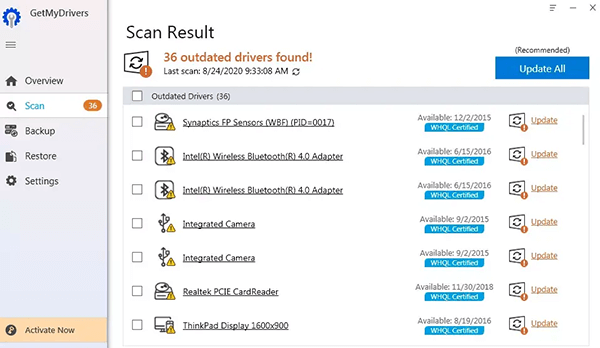
- Launch GetMyDrivers and click “Scan Now”.
- The software will automatically detect missing, outdated, or corrupt drivers and provide a detailed report.

Step 3: Update Drivers with One Click
- Click “Update All” to download and install the latest manufacturer-approved drivers.
- Alternatively, update individual drivers based on your preferences.
Step 4: Backup & Restore (Optional, but Recommended)
- Before installing updates, GetMyDrivers automatically creates a backup of your existing drivers.
- If needed, you can restore previous drivers to prevent compatibility issues.
Step 5: Enjoy a Faster, More Stable PC
- With updated drivers, your system will experience better performance, improved hardware compatibility, and fewer crashes.
- GetMyDrivers will continue monitoring your drivers to keep your PC optimized.
With GetMyDrivers, keeping your PC up to date is fast, secure, and effortless. Start optimizing your system today!
Frequently Asked Questions About GetMyDrivers
What is GetMyDrivers?
GetMyDrivers is an automated driver update tool that scans, detects, and updates outdated or missing drivers. It ensures optimal system performance, stability, and compatibility by keeping drivers up to date.
Why do I need to update my drivers?
Outdated drivers can cause slow performance, crashes, hardware malfunctions, and security vulnerabilities. Updating drivers ensures that hardware runs efficiently and remains compatible with new software and system updates.
Is GetMyDrivers safe to use?
Yes. GetMyDrivers only downloads drivers from official, verified manufacturers, ensuring safe and malware-free updates. It also offers backup and restore features to prevent compatibility issues.
How does GetMyDrivers work?
- Scans the PC to identify outdated, missing, or corrupt drivers.
- Provides a detailed report on necessary updates.
- Installs the latest manufacturer-approved drivers with one click.
- Creates driver backups to allow rollback if needed.
Can GetMyDrivers improve my PC’s speed?
Yes. Updating drivers ensures hardware functions at its best, leading to faster system performance, fewer errors, and better compatibility with new software and devices.
How often should I update my drivers?
For best performance, it’s recommended to scan for driver updates regularly. GetMyDrivers can automatically check for updates and notify users when new drivers are available.
Does GetMyDrivers work with all hardware?
Yes. GetMyDrivers supports a wide range of PC components and peripherals, including graphics cards, sound cards, network adapters, printers, external drives, and more.
Can I undo a driver update if something goes wrong?
Yes. GetMyDrivers includes a backup and restore feature, allowing users to revert to previous drivers in case of compatibility issues.
Is GetMyDrivers compatible with my operating system?
GetMyDrivers is compatible with Windows 11, Windows 10, Windows 8, Windows 7, Vista (both 32-bit and 64-bit versions).
Does GetMyDrivers require an internet connection?
Yes. An internet connection is required to download and install the latest drivers from verified sources.
Can I use GetMyDrivers on multiple devices?
GetMyDrivers offers multi-device licensing, allowing users to update drivers on multiple PCs under a single subscription.
Is GetMyDrivers free to use?
GetMyDrivers is available as a free download, allowing users to scan their system for outdated, missing, or corrupted drivers. However, to automatically update and install the latest drivers, a premium subscription is required.
The discounted price for the first year is $19.99 (regular price: $49.94). After the first year, the annual renewal price is $29.99. This ensures continuous access to automatic driver updates, backup & restore features, and enhanced system stability.
Is there a money-back guarantee?
Yes. GetMyDrivers comes with a satisfaction guarantee, offering customers a refund within a specified period (30 days) if they are not satisfied with the service.
Is there any additional fee beyond the GetMyDrivers subscription?
GetMyDrivers offers an optional LiveTech service for users who need expert technical support. LiveTech is free for the first month, and if not canceled, it automatically renews at $19.99 per month.
LiveTech provides on-demand tech support for PC troubleshooting, software assistance, and system optimization. If you do not wish to continue with LiveTech after the free month, you can cancel anytime before renewal by calling 1-801-857-2343 (Powered by USTechSupport) or using online chat, email, or the contact form.
LiveTech is a separate service from GetMyDrivers, and users can choose whether or not to keep the subscription based on their support needs.