Norton Parental Controls Guide
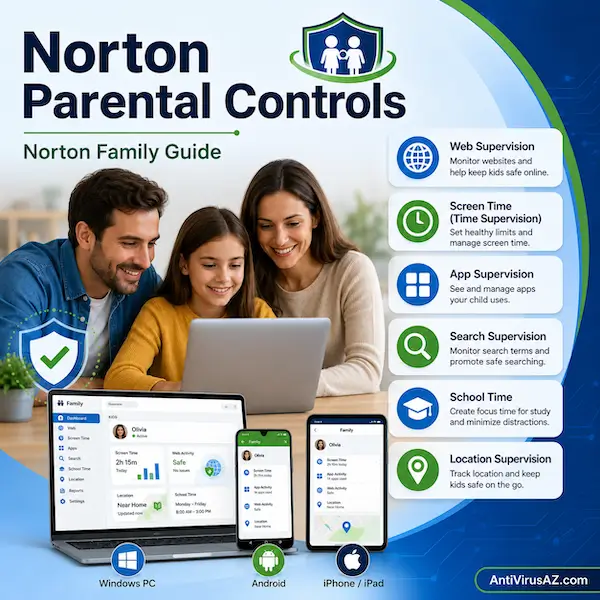
Norton parental controls are designed to help parents guide their children’s online activity through tools that support safer browsing, healthier screen-time habits, and better awareness of what children do on their devices. Today, Norton provides these parental control tools primarily through Norton Family, while some Norton 360 plans also include access to parental control features as part of a broader security subscription. Rather than acting as a simple website blocker alone, Norton’s parental control tools are meant to help parents manage several parts of a child’s digital life from one system.
This page explains how Norton parental controls work today, what features are available, and which devices are supported. It also helps clarify an important platform detail: Norton Family and Norton Parental Control features can be used on a child’s Windows PC, Android device, or iPhone/iPad, but they are not supported on Mac devices for child use. Because not every feature is available on every platform, it is useful to look at Norton parental controls as a flexible family toolset rather than as one identical experience across all devices.
Overview of Norton Family and Norton Parental Control
Norton Family is Norton’s main parental control solution and is designed to help parents supervise online activity, set rules, and create healthier boundaries for their children’s device use. Through Norton Family, parents can use tools related to web supervision, time supervision, search supervision, video supervision, app supervision, location supervision, and other family-management features, depending on the child’s device. Parents can usually manage these settings through Norton’s web portal and, in many cases, through the parent mobile app as well.
Although Norton 360 can include parental control access in some plans, the parental control experience itself is centered on Norton Family. In practical terms, that means parents who are specifically looking for website filtering, screen-time controls, search monitoring, app supervision, school-time tools, and location-related features are really looking at the Norton Family feature set. At the same time, it is important to remember that not all features are available on all platforms, and some features depend on browser extensions, the Norton Browser, or country availability. That is why understanding the platform differences is a key part of choosing and using Norton parental controls effectively.
How Norton Parental Controls Work
Norton parental controls work by giving parents a set of tools to supervise and manage a child’s device activity through one connected system. In most cases, the child’s supported device needs to have Norton Family or Norton Parental Control set up on it, while parents manage rules, reports, and alerts through the web portal or the parent mobile app. Norton presents this as a way to help children explore the internet with healthier boundaries rather than as a tool focused on one feature alone.
What Norton Family is
Norton Family is Norton’s current parental control service. It is designed to help parents supervise websites, search activity, screen time, apps, videos, and location-related activity on supported child devices, while giving parents one place to manage those settings.
How parents manage settings and supervision
Parents can manage Norton Family settings through Norton’s web portal and, on supported devices, through the parent mobile app. This allows them to review activity, change house rules, receive alerts, and adjust supervision settings even when they are away from the child’s device.
How child-device protection works
The child’s device must be a supported Windows PC, Android device, or iPhone/iPad for Norton Family or Norton Parental Control to be installed and used as the child-side supervision tool. Norton states that the service can be installed and used on those child-device platforms, but not all features are available on all of them.
Why feature availability depends on the device
Norton makes it clear that feature availability depends on the platform. Some features are available across Windows, Android, and iOS, while others are limited to only one or two platforms, and some depend on browser extensions or the Norton Browser for full functionality.
Devices and Platform Support
Platform support is one of the most important things for parents to understand before using Norton Family. Norton does not present parental controls as one identical experience on every device. Instead, it offers a family of features that work differently depending on whether the child uses Windows, Android, or iOS.
Supported child devices
Norton states that Norton Family and Norton Parental Control can be installed and used on a child’s Windows PC, Android device, and iPhone or iPad. These are the main child-device platforms supported by the service today.
What parents can use to monitor and manage activity
Parents can monitor and manage a child’s activity through the Norton Family web portal and through the parent mobile app on Android and iOS. Norton also states that parents can manage their child’s activities from other device types, including a Mac, by signing in to their account through a browser, even though Mac is not supported as a child device for Norton Family features.
Why Mac child devices are different
Norton specifically says that Norton Family and Norton Parental Control features are not supported on Mac devices for child use. That means a Mac cannot be treated as the child-side supervised device in the same way Windows, Android, and iOS devices can.
Why not all features are available on all platforms
Some Norton Family features work broadly across Windows, Android, and iOS, while others are available only on certain platforms. This is why parents should review both the feature list and the platform notes before assuming that every feature will work the same way on every child device.
Main Norton Parental Control Features
Norton Family includes a broad set of parental control features, but the exact experience depends on the device. The tools below are the main parts of the current Norton Family feature set and show how the product is meant to support safer browsing, healthier device habits, and more informed parenting online.
Web Supervision
Web Supervision helps parents block unsuitable websites while also keeping track of the sites their children visit. Norton says this feature is available on Windows, Android, and iOS, although some parts of functionality depend on supported browser tools.
Time Supervision
Time Supervision helps parents manage how much time children spend on their devices. Norton says parents can schedule times of day or week when the device may be used and control how many hours per day can be spent on that device. This feature is available on Windows, Android, and iOS.
Search Supervision
Search Supervision allows parents to see the words, terms, and phrases their children search for online. Norton lists this feature as available on Windows, Android, and iOS, with platform-specific notes around browser support and Norton Browser usage.
Video Supervision
Video Supervision helps parents see the YouTube videos their children watch on supported devices. Norton says it is available on Windows, Android, and iOS, but it also notes important limitations: it monitors videos viewed on YouTube.com rather than the YouTube app, and the exact method depends on browser extensions on Windows and the in-app Norton Browser on iOS and Android.
App Supervision
App Supervision helps keep parents informed about the apps their child downloads or installs. Norton lists this feature as available on Windows and Android, which means it is not part of the same app-management experience on iOS.
Location Supervision
Location Supervision helps parents see where a child’s Android or iOS device has been, including location history for up to 30 days. Norton states that this feature is available on Android and iOS and is not available in all countries.
School Time
School Time is designed to help parents manage a child’s remote-learning environment and keep the child more focused while school is in session. Norton lists this feature as available on Windows, Android, and iOS.
Instant Lock
Instant Lock allows parents to lock a child’s device so the child can take a break or refocus, while still allowing contact between parent and child. Norton lists this feature as available on Windows, Android, and iOS.
Email Alerts, Reports, and Parent Portal
Norton Family also includes features such as Email Alerts, Monthly and Weekly Reports, and the Parent Portal. These tools help parents stay informed about blocked-site attempts, online activity, and overall device supervision across supported child devices.
Feature Availability by Platform
Understanding platform differences is one of the best ways to use Norton Family effectively. Norton’s feature list makes clear that some features are broader on some child devices than others, which means the best experience depends partly on the platform used in the household.
Windows child devices
Windows offers one of the broader Norton Family feature experiences. Features such as Web Supervision, Time Supervision, Search Supervision, Video Supervision, App Supervision, Instant Lock, School Time, and reports are available there, with some features relying on supported browser extensions for full function.
Android child devices
Android child devices also receive strong support in Norton Family. Norton lists Android support for Web Supervision, Time Supervision, Search Supervision, Video Supervision, the Parent Mobile App, Location Supervision, School Time, Instant Lock, reports, and App Supervision.
iPhone and iPad child devices
iOS child devices support many Norton Family features, including Web Supervision, Time Supervision, Search Supervision, Video Supervision, reports, Instant Lock, School Time, and location-related tools. However, some of these features depend on the in-app Norton Browser, and iOS does not provide the same app supervision coverage Norton lists for Windows and Android.
What Mac users need to know
Mac devices are not supported as child devices for Norton Family or Norton Parental Control. Parents may still manage settings and view activity through a browser on a Mac, but the child-side supervised device itself cannot be a Mac under Norton’s current support rules.
Norton Family and Norton 360
Norton 360 and Norton Family are related, but they are not the same thing. This is important because many users see parental controls mentioned in connection with Norton 360 and assume the parental control system is built as a completely separate feature inside that product. In practice, Norton Family remains the main parental control experience, while Norton 360 may include access to it depending on the plan.
How Norton 360 includes parental control access
Some Norton 360 plans include parental control access as part of the broader subscription. This means families may receive parental control tools alongside device security, privacy features, and other Norton benefits in one plan.
Why Norton Family is still the main parental control product
Even when parental controls are bundled through Norton 360, the underlying parental control feature set is still centered on Norton Family. That is why parents who care mainly about child supervision, screen time, website rules, and similar tools are really evaluating the Norton Family experience.
When Norton Family may be the more relevant name for parents
For parents who are specifically looking for monitoring, filtering, time limits, app supervision, school-time support, and location-related tools, Norton Family is usually the more relevant product name to focus on. Norton 360 matters more when the family also wants broader device security in the same subscription.
What Norton Parental Controls Can Help Parents Manage
Norton parental controls are designed to help parents manage more than just blocked websites. The overall goal is to give families tools that support healthier digital habits, safer browsing, and better visibility into what children are doing online.
Screen time and device use
With tools such as Time Supervision and Instant Lock, parents can help guide how much time children spend on devices and when those devices may be used. This can make it easier to set boundaries around school, bedtime, or family time.
Web browsing and online content
Web Supervision helps parents manage the kinds of websites children can access and see which sites they have been visiting. This gives parents a more active role in guiding how children use the web.
Search activity and video viewing
Search Supervision and Video Supervision help parents stay more aware of what their children are looking for online and what they are watching on supported platforms. This can provide useful conversation starters and help parents respond to issues before they grow.
Apps, location, and school-time focus
App Supervision, Location Supervision, Favorite Locations, Alert Me, and School Time extend parental controls beyond basic website filtering. Together, these features help parents manage app use, keep up with location-related information, and support a more focused learning environment during school hours.
Healthy digital boundaries and parent-child communication
Features such as Access Request, Email Alerts, and scheduled device rules can also encourage communication rather than only restriction. Norton presents these tools as part of a broader effort to help parents guide their children’s digital habits with healthier boundaries.
Important Limits and Things to Know
Norton Family includes a strong set of parental control tools, but it is important to understand the limits before depending on it for every situation. Norton itself highlights several platform and feature conditions that parents should know in advance.
Not every feature works on every device
Norton clearly states that not all features are available across all devices. This means parents should check whether the features they care about most are supported on the child’s platform before relying on them.
Some features need browser extensions or Norton Browser
On Windows, some features such as Web Supervision, Search Supervision, and Video Supervision require supported browser extensions for full functionality. On iOS and Android, some features depend on the in-app Norton Browser instead of working the same way across every app and browser.
Location features are not available in all countries
Norton states that location-based tools are not available in all countries. Families who want those features should confirm availability in their region before treating them as a guaranteed part of the product.
Video supervision does not cover every viewing method
Norton says Video Supervision monitors videos viewed on YouTube.com, not YouTube videos embedded on other sites, and it does not work with the YouTube app. Norton also notes Hulu-related limits, with Hulu monitoring only on Windows. These details are important because parents may otherwise assume broader video coverage than Norton actually provides.
Who Norton Parental Controls May Be Best For
Norton parental controls may be a good fit for families that want more visibility into a child’s digital activity without relying only on basic built-in device limits. The product is especially useful when parents want a mix of supervision, screen-time controls, reports, and broader family management tools in one place.
Families with children using Windows PCs
Families with Windows child devices may benefit the most from the broader feature set available on that platform, especially when they want app supervision, video supervision, web controls, and screen-time management together.
Parents managing Android or iPhone/iPad use
Parents with children using Android phones, Android tablets, iPhones, or iPads can also get strong value from Norton Family, especially for screen time, web supervision, search supervision, and location-related tools where available.
Households that want both device security and parental controls
For households that want broader security together with parental control tools, a Norton 360 plan that includes parental controls can make sense. This allows parents to combine general device protection with child supervision features under the Norton brand.
Parents who want web-based management and mobile alerts
Norton Family may also be a strong fit for parents who want to monitor activity and adjust rules without sitting at the child’s device. The parent portal, parent mobile app, alerts, and reports make it more flexible for families who want ongoing visibility while on the go.
Common Questions About Norton Parental Controls
The questions below cover some of the most common things parents want to know when comparing Norton Family and Norton Parental Control features.
What is Norton Family?
Norton Family is Norton’s parental control service. It is designed to help parents supervise web activity, screen time, app use, search activity, videos, and location-related activity on supported child devices.
Does Norton 360 include parental controls?
Some Norton 360 plans include parental control access, but the parental control experience itself is centered on the Norton Family feature set. That is why Norton Family remains the key product name for this part of Norton’s offering.
Can Norton Family be used on a Mac?
Norton states that Norton Family and Norton Parental Control features are not supported on Mac devices for child use. Parents can still manage settings through a browser on a Mac, but the child device itself cannot be a Mac.
What devices support Norton Parental Control?
Supported child devices are Windows PCs, Android devices, and iPhone/iPad devices. Not all features are available on all of those platforms.
Are all Norton Family features available on every platform?
No. Norton clearly says that not all features are available on all devices, and some require browser extensions, Norton Browser, or region-specific availability.
Can parents manage Norton Family from a phone?
Yes. Norton offers a parent mobile app on Android and iOS, and parents can also manage activity through the Norton web portal.
Does Norton Family support location tracking?
Norton offers location-related tools such as Location Supervision, Favorite Locations, and Alert Me on Android and iOS, but Norton also notes that location features are not available in all countries.
Can Norton Family help with school-time device use?
Yes. Norton lists School Time as a feature designed to help parents manage their child’s remote-learning environment and keep the child focused while school is in session on Windows, Android, and iOS.
Learn More About Norton Family and Norton Products
If you want to explore related Norton topics in more detail, you can also visit our Norton Products and Services Overview, read our Internet Security Solutions by Norton page, review our Norton 360 Questions and Answers, or browse our main Norton products and services page for more product and family-safety resources.
« Back to the Norton Resource Center