
Norton Utilities Ultimate: Clean, Optimise, and Maintain Your Devices
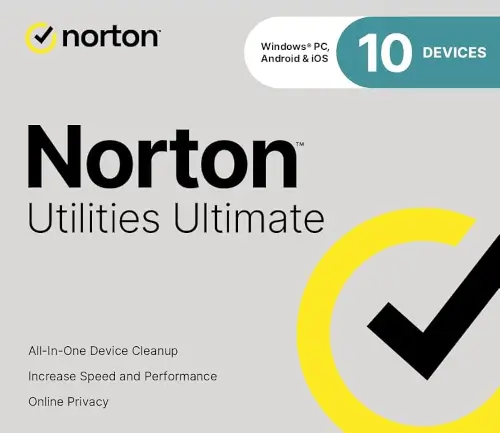
Keep Your Devices Running Like New with Norton Utilities Ultimate
Download version
Clean, optimise, and maintain your devices for smoother performance
For up to 10 devices – $59.99
Windows, Mac, Android, iOS
BUY NOW
What Norton Utilities Ultimate Can Do:
- Helps keep your devices running smoothly by automatically cleaning junk files and unnecessary data.
- Stops apps and background processes that slow down your device to improve overall performance.
- Removes clutter and frees up storage space by identifying unnecessary files and unused apps.
- Automatically maintains your devices so you always have enough storage space available.
- Completely uninstalls unwanted programs and leftover files to free up valuable storage.
- Cleans browser data to help protect your privacy and remove unnecessary browsing history.
- Helps organise cloud storage by identifying unnecessary or duplicate files.
- Finds and removes duplicate or unnecessary photos and videos to reclaim space on your devices.
Other Norton Products and Services in Australia
For more information visit Norton.com
Optimise and Maintain Your Devices with Norton Utilities Ultimate
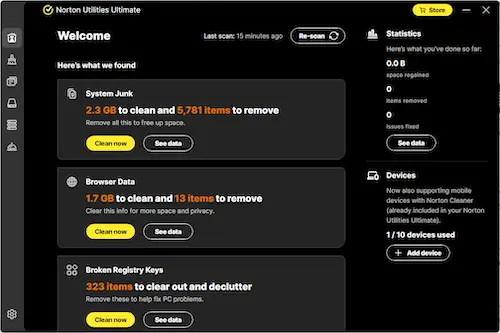
Norton Utilities Ultimate is designed to help keep your devices running smoothly, organised, and responsive. Over time, computers and mobile devices accumulate unnecessary files, unused apps, and background processes that slowly reduce performance. Norton Utilities Ultimate helps address these issues by cleaning up clutter, managing system resources, and maintaining device health automatically.
Whether you use a Windows PC, Mac, Android, or iOS device, Norton Utilities Ultimate provides a set of tools designed to improve performance, free up storage space, and keep your devices organised. With automatic maintenance, cleanup tools, and resource management features, it helps your devices stay efficient without requiring constant manual maintenance.
Keep Your Devices Running Smoothly
Available on: Windows, Mac, Android
As devices age, performance can decline due to unnecessary files, background tasks, and system clutter. Norton Utilities Ultimate helps restore responsiveness by identifying issues that may slow down your system and addressing them automatically.
Its optimisation tools monitor system activity and help ensure that applications and processes are using resources efficiently. By managing system load and reducing unnecessary background activity, the software helps improve responsiveness when launching applications, browsing the web, streaming media, or performing everyday tasks.
The result is a device that feels more responsive and easier to use, even after months or years of regular use.
Free Up Valuable Storage Space
Available on: Windows, Mac, Android
Over time, devices collect large numbers of temporary files, unused applications, and duplicate media that consume valuable storage space. Norton Utilities Ultimate helps you reclaim storage and reduce digital clutter so your device has more room for the files and apps you actually need.
Cleanup tools scan your device to identify files that are no longer needed. These may include temporary files, leftover installation files, unused application data, and other system clutter that accumulates during everyday use.
By removing unnecessary files and organising storage more effectively, Norton Utilities Ultimate helps your device operate more efficiently while giving you back valuable disk space.
Buy Norton Utilities Ultimate – $59.99
Stop Apps That Slow Down Your Device
Available on: Windows, Mac, Android
Many devices run numerous background processes that quietly consume CPU power, memory, and storage resources. These processes can slow down system performance and reduce battery efficiency.
Norton Utilities Ultimate includes tools that help identify resource-intensive applications and allows you to stop or manage them when they are no longer needed. By controlling unnecessary background activity, your device can focus more resources on the programs and tasks that matter most.
This helps improve response times when launching applications, switching between tasks, or performing demanding activities such as video streaming, gaming, or editing media.
Automatically Maintain Your Device
Available on: Windows, Mac, Android
One of the biggest challenges for many users is remembering to perform regular system maintenance. Norton Utilities Ultimate simplifies this process with automatic cleanup and maintenance features that help keep your device optimised in the background.
Automatic cleaning tools regularly scan for unnecessary files and system clutter, helping maintain free storage space and prevent performance issues before they become noticeable. These automated processes work quietly in the background so you can focus on your tasks while the software keeps your device maintained.
With automated maintenance, your system can remain organised and responsive without requiring constant manual cleanup.
Organise Photos, Videos, and Media Files
Available on: Mac, Android, iOS (photos only on Mac)
Media files such as photos and videos are among the largest contributors to storage usage on modern devices. Duplicate images, large video files, and unnecessary screenshots can quickly fill available storage.
Norton Utilities Ultimate includes media cleanup tools that help identify duplicate or unnecessary media files so you can reclaim storage space. These tools can locate similar images, unused screenshots, and other media clutter that may otherwise go unnoticed.
By organising and removing redundant media files, you can maintain a cleaner storage environment and make it easier to locate the photos and videos that matter most.
Manage Apps and Remove Unwanted Programs
Available on: Windows, Mac, Android
Unused applications and leftover installation files can consume significant system resources and storage space. Norton Utilities Ultimate includes an advanced uninstaller designed to help remove unwanted programs completely.
This tool helps eliminate not only the main application but also leftover files and configuration data that may remain after a standard uninstall. Removing these remnants helps keep your system cleaner and prevents unnecessary storage usage.
Keeping your device free of unused software can improve both performance and system organisation.
Clean Browsing Data and Protect Privacy
Available on: Windows, Mac, Android
Web browsers store various types of data during normal use, including browsing history, cached files, and tracking information. While these files can help speed up browsing in some cases, they can also accumulate quickly and take up storage space.
Norton Utilities Ultimate includes browser cleanup tools that help remove unnecessary browsing data and reduce digital clutter. Cleaning browser data can also help protect your privacy by removing stored browsing information from your device.
With regular cleanup, your browser can remain efficient while helping to keep personal browsing activity private.
Recover Lost Files When Accidents Happen
Available on: Windows
Accidentally deleting important files can happen to anyone. Norton Utilities Ultimate includes data recovery tools designed to help locate and restore files that may have been deleted unintentionally.
These recovery tools scan your storage device to identify recoverable files and provide options for restoring them when possible. This can be particularly helpful for recovering important documents, photos, or other files that might otherwise be lost permanently.
Having recovery tools available provides an extra level of reassurance when managing important data.
Support for Multiple Devices
Modern households often rely on multiple devices, including laptops, desktops, and mobile devices. Norton Utilities Ultimate is designed to support multiple platforms and devices, allowing you to maintain performance across your digital environment.
The software supports Windows, Mac, and Android systems, with certain media cleanup features available for iOS devices. This flexibility allows users to manage storage, remove clutter, and maintain performance across different devices using a consistent set of tools.
With support for multiple device types, Norton Utilities Ultimate helps simplify device maintenance for households and individuals who rely on several systems every day.
Simple Tools Designed for Everyday Users
Norton Utilities Ultimate is designed to make system maintenance accessible even for users who are not technical experts. The interface organises optimisation tools in a clear and intuitive way, allowing users to run scans, clean up files, and manage resources with just a few clicks.
Many tools can also run automatically or in the background, helping maintain performance without interrupting normal device use.
The goal is simple: help your devices stay organised, efficient, and responsive without requiring complicated maintenance routines.
A Smarter Way to Maintain Device Performance
Devices naturally slow down over time as files accumulate and background processes consume resources. Norton Utilities Ultimate provides a collection of tools designed to help counter these effects and keep your devices performing at their best.
By combining cleanup tools, resource management, media organisation, and automatic maintenance, the software helps reduce clutter, free up storage space, and improve overall system responsiveness.
The result is a cleaner, more efficient device experience that helps you focus on your work, entertainment, and everyday activities without being slowed down by unnecessary system clutter.
Compare Norton Utilities Ultimate to Norton 360
Some users wonder whether Norton 360 can replace Norton Utilities Ultimate. While both products come from Norton, they are designed for different purposes. Understanding how they compare can help you decide whether you need one of them or both.
Norton Utilities Ultimate and Norton 360 are both part of the Norton product family, but they are designed for very different purposes. Norton Utilities Ultimate focuses on device cleanup, storage management, and performance optimisation, while Norton 360 is designed to provide cybersecurity protection against threats such as malware, ransomware, and phishing attacks.
While Norton 360 includes some basic system maintenance tools, its primary role is to help keep your devices and personal data safe online. Norton Utilities Ultimate, on the other hand, focuses on keeping your devices organised and running efficiently by removing unnecessary files, managing background processes, and maintaining system performance over time.
Because these products address different needs, many users choose to use them together. Norton 360 helps protect your devices from online threats, while Norton Utilities Ultimate helps maintain performance and free up valuable storage space.
If you want to understand the differences in more detail, see our full comparison of Norton Utilities Ultimate vs Norton 360. The guide explains how the features, pricing, and device coverage compare so you can decide which product best fits your needs.
System Requirements
Windows (Norton Utilities Ultimate)
Operating Systems
- Microsoft Windows 11, Windows 10, Windows 8.1, Windows 8, Windows 7 with Service Pack 1 (SP1) or later (32-bit and 64-bit versions)
- Microsoft Windows 11 with ARM processors (excluding Windows in S mode, Mixed Reality, Mobile, IoT, Starter, and RT editions)
- Internet connection required to activate the product and receive updates
Hardware
Processor
- 1 GHz processor or faster
Memory
- 1 GB RAM for 32-bit systems
- 2 GB RAM for 64-bit systems
Display
- SVGA (1024 × 768) video display
Additional Software
- .NET Framework 4.6.2 or later
Hard Disk Space
- 100 MB available hard disk space (works only on non-SSD hard drives)
Supported Browsers
- Mozilla Firefox (32-bit and 64-bit)
- Google Chrome (32-bit and 64-bit)
- Microsoft Edge
- Opera
- Internet Explorer
Android (Norton Cleaner)
Operating System
- Android 10.0 or later
- Google Play app must be installed
iOS (Norton Cleaner)
Operating System
- iOS 16.0 or later
Mac®
Operating System
- macOS 11.x or later
Some features of Norton Utilities Ultimate vary depending on the platform. The Cloud Backup feature is available only on Windows and is not supported on Windows in S mode or on Windows devices running ARM processors. On iOS devices, several tools are not available, including Browser Data cleanup, Automatic Cleaning, Processes management, System Junk removal, and the Uninstaller. On Mac systems, media cleanup is limited to photos and does not include video files. Additionally, files deleted using the Data Shredder tool in Norton Utilities Ultimate are permanently removed and cannot be recovered.
* Subscription, Pricing and Offer Details:
For the most up-to-date details on subscription terms, pricing, automatic renewal, refunds, supported devices, and product features for Norton in Australia, please visit the official Norton.com website. All subscription conditions, offers, and policies are provided directly by Norton and may change over time.